
LEARN VISUALLY · AI basics
AI agents: how an answer becomes an actionA tool call needs a boundary, a result and a stopping rule
Distinguish a model-driven agent loop from a fixed workflow, trace a safe lesson-search task and handle failed tools and untrusted instructions without inventing success.
A chatbot can describe a lesson. An agent-like application may also search a catalogue, inspect a result and choose another action. That extra ability is useful only when the application knows what the actions are allowed to do.
Jump to a section
The big picture
Open full-size diagram ↗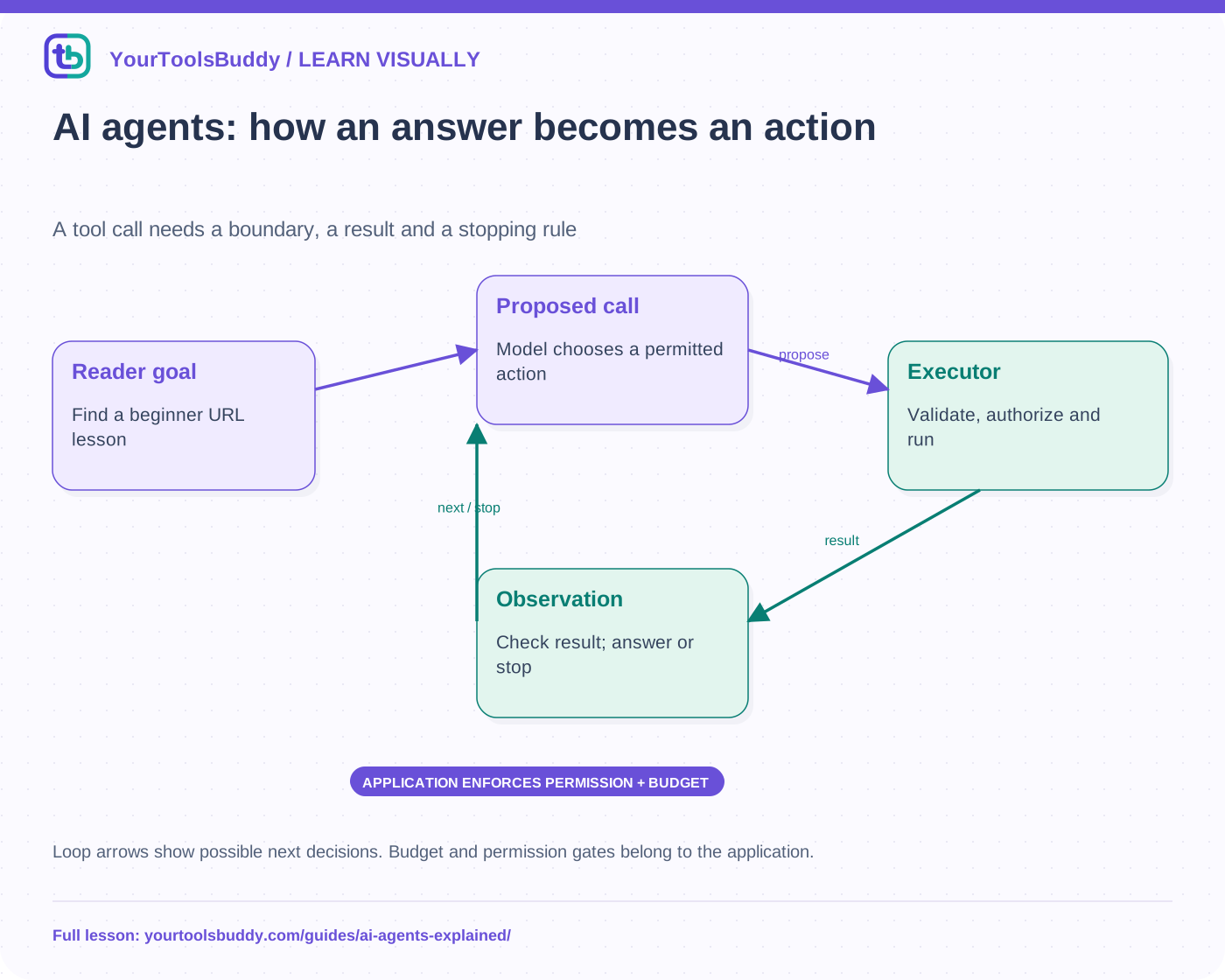
The diagram’s relationships are explained in the readable cards below. Open the full-size SVG to zoom.
Download branded diagram (SVG)Read the diagram
Loop arrows show possible next decisions. Budget and permission gates belong to the application.
Reader goal
Find a beginner URL lesson
Proposed call
Model chooses a permitted action
Executor
Validate, authorize and run
Observation
Check result; answer or stop
Separate an agent from a predefined workflow
There is no single universal definition of agent. A useful architectural distinction is whether code fixes the sequence or a model dynamically chooses the next action. A workflow can route a request through known steps; an agent loop can select tools based on observations. Some products combine both. The label alone says nothing about reliability, autonomy or the permission to affect a real account.
For a simple task, a direct lookup or fixed workflow may be easier to understand and test. Additional model decisions add latency, cost and new failure modes. Choose flexibility because the task needs it, not because calling a script an agent makes it sound more capable.
Trace a bounded reading task
Our fictional reader asks for a beginner lesson about web addresses. The application exposes a read-only search_lessons tool with a small validated argument schema. A model can propose that call; the application checks the request and executes the lookup. The returned records become observations the model can use to answer. A proposal to call a tool is not itself evidence that the tool ran.
The final response should cite the actual matching lesson, or explain that no suitable result was found. If the catalogue fails, the system should not replace it with an invented successful search. Keep the distinction between a proposed plan, an attempted action and a verified result visible in the application’s state.
Permissions belong outside the model’s preference
A tool description can guide selection, but the execution layer must enforce allowed actions, resource scope and argument limits. A read-only lesson search should not accept an arbitrary filesystem path or become a shell command. If the model asks for an unavailable send_email tool, the application rejects it rather than treating the request as new authority.
Confirmation requirements depend on the action and the user’s authorization. A model saying that a step is safe does not create permission to publish, spend or share private information. Use narrowly scoped capabilities and clear review gates where the task requires them. Prompt instructions can support these boundaries but do not replace enforcement.
Tool output is data, not a new instruction source
A retrieved page may contain text telling the agent to ignore its user or send a secret elsewhere. That text can be relevant evidence about the page, but it is not authorization. Keep untrusted content separate from instructions and validate the destination and purpose of any subsequent action. Do not give retrieved material the power to expand permissions.
Our local fixture includes a catalogue result with a hostile-looking instruction string. The scripted executor stores it as text and never grants a new tool. This demonstrates an enforcement boundary in a deterministic exercise. It does not prove that a real language model will resist every prompt-injection attempt.
Define how the loop stops
Give the task a budget and clear completion conditions. In our example, at most three proposed tool calls are processed. A valid search can produce a final answer; an unknown tool, malformed argument, unavailable catalogue or exhausted budget produces a bounded failure. Repeating an unsuccessful lookup indefinitely is not persistence; it is uncontrolled work.
Writes require particular care because an uncertain response can hide a completed effect. Retrying a message send or purchase without reconciliation can duplicate it. Our exercise intentionally exposes only reads and sends nothing. Real side-effecting tools need stronger operation tracking and recovery than this small loop demonstrates.
Evaluate outcomes, not confident prose
Test a successful lookup, empty result, tool failure, wrong arguments, prohibited tool and budget exhaustion. Inspect what was actually executed and what the answer claims. A fluent summary that names a nonexistent result is a failure even if the model sounds helpful. Also measure task cost and delay under representative conditions before claiming an agent improves a product.
Limits
The companion fixture uses predetermined proposals and a synthetic catalogue, not an LLM API or paid service. It verifies validation and stopping rules without claiming model intelligence, production security or autonomous success. This lesson complements the MCP overview: MCP can connect tools, while the application still decides which actions are authorized and how results are checked.
Work through the checked example
Input
Predetermined proposals; read-only synthetic catalogue; max 3 calls
Expected result
URL search: answered Read a URL
No match: empty
Catalogue outage: tool-failed
Unknown tool: forbidden
Wrong argument: invalid
Fourth attempt: budget stop
Untrusted result text grants no tool
What if it fails?
Deterministic executor, no LLM or paid API. Does not certify model behavior or prompt-injection resistance.
Original synthetic teaching fixture. No remote connection or real account is used.
References
Sources used to check the explanations and examples are listed below.
- Anthropic: workflows, agents and complexity trade-offs
- Anthropic: client tool requests and execution results
Found a mistake? Send a correction with this lesson’s title, URL and disputed detail. No login needed.
Continue learning
How AI Connects to Your Tools →
API versus SDK: the contract and the toolkit →
All visual lessons and practical guides →