
LEARN VISUALLY · Software basics
API versus SDK: the contract and the toolkitExplained visually
Distinguish a callable interface from a toolkit that helps use it, and explain why a wrapper does not remove service permissions or errors.
Two developers can call the same lesson service in different ways. One writes an HTTP request directly; another uses a library function. Both still depend on the service contract. The convenience layer changes their code, not the server’s obligations.
Jump to a section
The big picture
Open full-size diagram ↗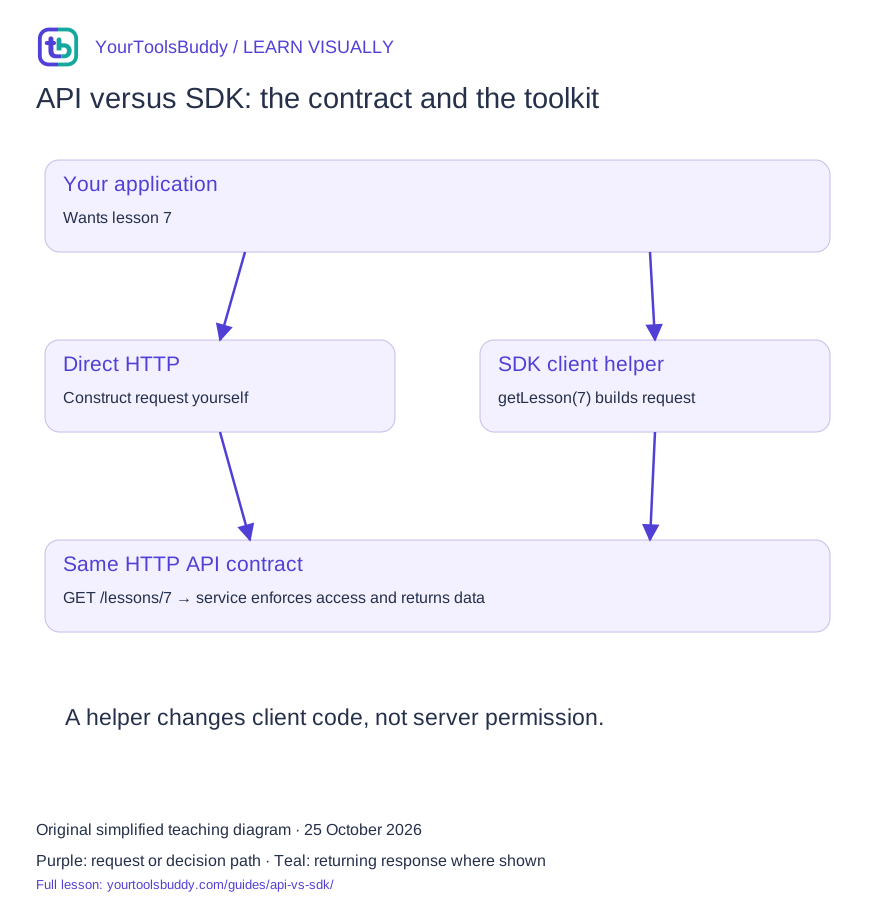
The diagram’s relationships are explained in the readable cards below. Open the full-size SVG to zoom.
Download branded diagram (SVG)Read the diagram
Two alternative client paths converge on the same service API. An SDK may contain much more than this helper.
Your application
Wants lesson 7
Direct HTTP path
Build and validate a request
SDK path
Call a helper from a toolkit
Shared API
Defines accepted operations
Service
Enforces access and returns a result
What you will learn
Distinguish a callable interface from a toolkit that helps use it, and explain why a wrapper does not remove service permissions or errors.
Prerequisites: comfortable reading a web address. No programming is required for the explanation.
Name the contract
An API is an interface software can use. In this lesson it is an HTTP service contract describing operations, inputs and outputs. APIs are not limited to web endpoints: a local library can also expose an API. OpenAPI is one way to describe HTTP APIs; an API does not require that format.
Name the toolkit
An SDK packages developer support for a platform or service. It can include libraries, examples and tools. Its exact contents vary. A client library inside it may construct requests and parse results. Do not assume every SDK provides the same retries, authentication or compatibility.
Follow both routes
Our synthetic direct call requests /lessons/7. The alternative helper getLesson(7) constructs that same path. Both return the same fixture. The tiny helper is deliberately only a client-wrapper illustration; it is not a real vendor SDK or a complete toolkit.
Keep the boundary visible
A helper cannot grant permissions the server does not allow. Unsupported operations, timeouts and validation failures still need handling. Before adopting a real toolkit, check its supported language/runtime, API version, maintenance and retry behavior. Convenience can introduce dependency and version costs.
Start with two developers solving the same task
Imagine two developers building a reading app for the same fictional lesson service. Both need lesson 7. One constructs GET /lessons/7 directly and parses the response. The other calls client.getLesson(7) from a toolkit. Their code looks different, but both ultimately depend on the service accepting an operation and returning data that matches its contract. That shared dependency is the most useful starting point for understanding an API and an SDK. They are related choices at different layers, not rival names for the same thing.
The practical question is not which abbreviation is better. Ask what responsibilities the interface defines and which of those responsibilities a particular toolkit helps your application perform. A small application making one straightforward request may value explicit code and a small dependency set. A larger integration may benefit from maintained models, configuration support or other helpers. Neither decision removes the need to understand the service's permissions, errors and version behavior. Convenience changes the work you write; it does not eliminate the work the system must do.
We will use an invented service and a tiny wrapper to inspect that boundary. The wrapper is not a vendor SDK, and our local exercise does not make a remote request. It isolates one read operation so we can compare inputs, outputs and failures. Real toolkits contain different features and support different languages. Do not infer that every package calling itself an SDK supplies the behavior discussed here, or that a short example demonstrates production readiness.
The interface is a contract the client must understand
For our fictional API, the contract says how to ask for a lesson, which identifier to supply, what a successful representation contains, and how failures are reported. An API need not be a web service: a library can expose functions as an interface too. In this lesson, HTTP gives us a visible boundary between client and service. That makes it easy to distinguish the network operation from the helper function that creates it.
An interface description can document operation paths and data shapes. OpenAPI is one format for describing HTTP APIs, not a requirement that makes every interface an API. A description is valuable when it matches actual behavior and is maintained with the service. It cannot, by existing alone, guarantee that an implementation is correct, that your account is authorized, or that every failure is covered. Treat documentation as a contract to check against observed behavior in permitted tests, not as proof that the whole integration works.
Suppose the contract permits a missing lesson to return a 404 and a successful lesson to include id and title. The direct client and toolkit client both need an appropriate way to handle that distinction. A toolkit may turn the response into a typed object or an exception, but the underlying application outcome remains relevant. If the reading app must show a useful not-found message, that requirement belongs to the app regardless of how little request-construction code the toolkit exposes.
The toolkit can help at several different points
A real SDK may include client libraries, examples, command-line tools or other platform support. A client library might build requests, serialize input and turn responses into language-specific objects. Some toolkits also help configure credentials or expose retry settings. Check the particular package's documentation for those capabilities. A label such as official SDK is not enough to infer its defaults, supported runtime, cancellation behavior or maintenance status. Those details determine whether it fits your application.
Imagine our helper takes the integer 7, constructs /lessons/7, sends a read through an injected transport and returns the lesson object. That is useful even though it is a tiny fraction of a complete SDK. It centralizes path construction and allows the app to call a meaningful operation name. If the service later changes its path, one maintained helper may be easier to update than many scattered string concatenations. The benefit depends on adoption and maintenance, not simply on the presence of an extra layer.
There are also costs. Another package adds a version to track and an abstraction to understand. It may expose fewer service features than the raw interface, or it may assume a runtime that does not match yours. A wrapper can make the normal case shorter while making an unusual error harder to inspect. These are reasons to evaluate the toolkit against actual tasks. They are not reasons to reject all SDKs or to rewrite a maintained library without accounting for the work it already handles.
Follow both client paths to the same boundary
In the direct path, the app builds the request for lesson 7, sends it, checks the response, parses the representation and validates the data it needs. In the helper path, some of those steps move into the library. The app still chooses the lesson, supplies configuration, handles the library's outcome and renders a useful result. Draw the two paths so they converge at the same service interface. That composition makes the distinction clearer than two disconnected lists of acronym definitions.
Now pass an unsupported identifier. The direct client may construct a malformed target unless it validates the input. The helper may reject the argument before sending anything, or it may pass it through. Neither behavior should be assumed. Read the documented contract and test representative cases. If your app accepts a lesson id from a route, validate it at the appropriate boundary and decide what the user should see when it is invalid. A helper call is not a substitute for thinking about input.
Next, simulate an unavailable service. Both paths still depend on a result they may not receive. A toolkit might retry, wrap the failure, expose a status, or provide cancellation; the particular behavior matters. A product message that says the SDK failed does not help the reader distinguish a missing lesson from a temporary connection problem. Translate the relevant outcome into a useful application state while retaining safe diagnostic information for the people maintaining the integration.
Permissions do not come from a convenient function name
Suppose the toolkit exposes deleteLesson(7). Its existence does not mean the current user may delete lesson 7. The service must enforce its access rules independently of what functions the client can call. A developer can construct a direct request without the toolkit, so hiding a button or omitting a helper is not a security boundary. The app's user interface and local checks can improve usability, but the service remains responsible for protecting the operation it exposes.
Credentials are another boundary to examine carefully. Do not put a secret in public browser code because a quick-start example is shorter that way. Use the authentication pattern appropriate to the application and service. The SDK can support configuration, but configuration is not authorization policy. For a beginner evaluating a package, ask where credentials live, what permissions they have, and which component will actually make the request. If those questions are unclear, pause before integrating the package into a sensitive workflow.
Our fictional reading app needs only a read operation. That is a useful scope constraint: we can demonstrate retrieving a lesson without pretending to exercise account administration, publishing or deletion. When evaluating a real toolkit, start with the smallest permitted task and expand deliberately. A successful read does not prove a write workflow is safe, that all accounts behave the same, or that every function in the package has been reviewed. Evidence should stay attached to the behavior actually checked.
Choose using a small comparison plan
Write down three representative tasks before choosing direct HTTP or an SDK. For the reading app, use a successful lesson read, a missing lesson, and a request that is cancelled or fails before a result arrives. Add the runtime and deployment constraints. Can the library run in the environment you actually use? Does it provide access to the response information you need? Is its supported service version clear? These questions give a trial something concrete to answer.
Compare maintenance work, not just the number of lines in a happy-path sample. Direct code may be short today but leave you maintaining serialization, error mapping and interface changes. A toolkit may save that work but bring upgrade and compatibility decisions. A fair comparison uses the same operation, equivalent settings and the same success criteria. Do not claim one is faster or more reliable from a synthetic example that makes no network request or from a package's marketing description.
Document the reason for the choice so the next maintainer can revisit it. For instance, the app might choose a maintained client because its supported runtime and cancellation behavior match the product, while retaining a small adapter around it. Another app might choose direct calls because its one read operation is stable and the available SDK does not support its environment. Both can be reasonable conclusions when the trade-offs are explicit. Neither becomes a universal recommendation for every project.
Upgrades can change both sides of the integration
The service interface and the toolkit package have separate versions and change histories. Updating a package does not necessarily upgrade the remote service, and a service change can affect an app even when its package lockfile is unchanged. Check compatibility rather than assuming that matching-looking version numbers imply the same thing. In a maintenance record, identify the service behavior you depend on, the toolkit version you use, and the representative checks that were run after a change.
Imagine the fictional service begins returning title as an object with text and language rather than a string. The direct parser and the helper-based app can both break if they expected a plain string. A newer SDK might adapt the representation, or it might expose the change directly. Your rendering code still needs a clear expected shape. Keeping a validation boundary near the app's use of the data makes failures more understandable and reduces the chance of silently displaying the wrong value.
Retry defaults deserve special attention for operations with side effects. A package update that changes retry behavior can alter the workload even when your call site looks identical. Consult the actual library's documentation and release notes, then test the behavior that matters in a controlled environment. Do not transplant a read-only fixture's assumptions into a create, payment or deletion workflow. A small adapter can make the app's intended policy explicit, but it does not create guarantees the remote service never offered.
Practice: review a proposed shortcut
A teammate proposes installing a library because client.getLesson(7) is easier to read than constructing an HTTP request. That is a valid usability observation, but it is not a complete evaluation. Ask what the function returns when lesson 7 is missing, how a cancelled request is reported, and whether the app's runtime is supported. Ask how credentials are supplied and what information is available for diagnosis. The answer can be a short evidence note, not a long approval ceremony.
For a local fixture, arrange for the direct path and helper path to use the same fake transport. Both should request /lessons/7 and return the same lesson value. Then make the transport report a missing lesson and compare how the two callers handle it. This exercise proves equivalence only for those cases. It does not measure network performance, validate a commercial SDK, or exercise every possible error. Keeping the claim narrow makes the example more trustworthy and easier to reproduce.
Finally, explain the choice in ordinary language to a colleague who does not write code. A useful answer is that the API defines what the service accepts, while the selected toolkit helps the app use that interface and still needs configuration and error handling. The app remains responsible for its own user experience, and the service remains responsible for its access rules. If that explanation fits your design, you have kept the important responsibilities visible instead of letting an acronym hide them.
What this lesson leaves out
The fixture demonstrates equivalence for one read operation only. It makes no performance, completeness or security claim about a commercial SDK.
A worked example you can check
Input
Direct: transport("/lessons/7")
Wrapper: getLesson(7) constructs the same path.
Expected result
Both return { id: 7, title: "Read a URL" }. Two calls, same fixture record.What if it fails?
getLesson(-1) rejects with RangeError before calling transport. This small wrapper is not a complete SDK.
Original synthetic teaching fixture. No remote connection or real account is used.
References
Sources used to check the explanations and examples are listed below.
Found a mistake? Send a correction with this lesson’s title, URL and disputed detail. No login needed.
Continue learning
Read a URL before you share it →
DNS: finding an address without fetching a page →
All visual lessons and practical guides →