
LEARN VISUALLY · Web basics
DNS: finding an address without fetching a pageExplained visually
Explain how a recursive resolver can use cached data or referrals to answer an address lookup, and distinguish that from loading a web page.
Imagine a browser knows the name of a library website but needs an address. DNS supplies records associated with names. The later website request is a different operation: a DNS answer does not contain the library page.
Jump to a section
The big picture
Open full-size diagram ↗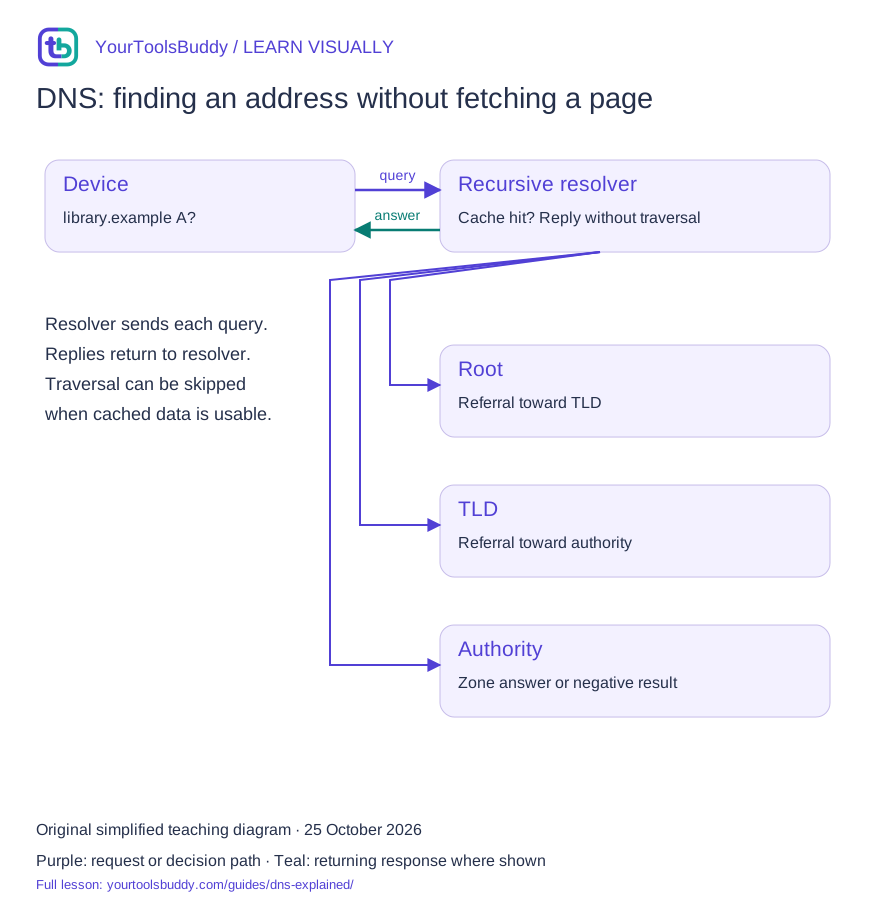
The diagram’s relationships are explained in the readable cards below. Open the full-size SVG to zoom.
Download branded diagram (SVG)Read the diagram
Cold lookup: resolver queries servers separately. It does not forward a browser page through this chain.
Device
Asks its configured resolver
Recursive resolver
Checks reusable cached records
Root server
Can refer toward the top-level domain
TLD server
Can refer toward the authority
Authoritative server
Answers for its own zone
What you will learn
Explain how a recursive resolver can use cached data or referrals to answer an address lookup, and distinguish that from loading a web page.
Prerequisites: comfortable reading a web address. No programming is required for the explanation.
Begin with the question
Our fixture asks for an A record for library.example. An A record represents an IPv4 address; an AAAA record represents an IPv6 address. Other record types answer different questions. The documentation address in this lesson is synthetic and is never contacted.
Give the resolver its own role
A recursive resolver does the work of pursuing an answer for the client. On a cache miss it can follow referrals through the namespace. An authoritative server answers from the zone data it serves. These roles are different even when software supports both.
Read the arrows carefully
Each query in our cold-path illustration starts at the resolver. A root referral helps locate a relevant top-level-domain server; another referral can locate the zone authority. Replies return to the resolver. Real lookups can skip these steps when useful data is already cached.
Allow for expiration and failure
A cached record has a remaining lifetime. Our simplified fixture begins with a 60-second TTL: 59 seconds later it has 1 second left; at 60 seconds it is expired. DNS can also return a negative answer or fail to answer. A timeout is not proof that a name does not exist.
Begin with a page that will not open
You type a lesson website into a browser and wait. Several jobs must succeed before the page appears, and DNS handles only part of that journey. In our teaching scenario, the browser needs an address associated with learn.example.com. It then needs a working connection and an HTTP exchange before it can display the lesson. A DNS answer is useful progress, but it is not a downloaded page, a successful login, or proof that the application behind the address is healthy.
Use a fictional support conversation to keep the layers clear. A reader says that the lesson site is down. One colleague can resolve its name but receives an HTTP error. Another cannot obtain an address at all. Those observations do not describe the same failure. The first investigation should examine the connection and application after name resolution; the second should examine the name lookup path. Asking which step failed is more productive than immediately changing every DNS setting on the device.
This lesson uses simplified records and documentation addresses. A sample answer of 192.0.2.7 is not an endpoint to visit, and our timeline is not a measurement of a public service. The purpose is to follow a lookup and reason about repeated requests. Real devices may use several caches, several record types, encrypted transports and other mechanisms. We will leave those details outside the main diagram until they change the conclusion a beginner needs to draw.
Give each participant a clear job
Think of the application as the requester and the recursive resolver as the component doing the lookup work on its behalf. An authoritative server supplies answers for the DNS data it serves. A root or top-level-domain server can provide a referral that helps the resolver continue toward the relevant authority. These are logical responsibilities. The arrows in a teaching diagram should tell you who asks whom, not imply that the browser personally walks through every public DNS level for every page.
In a cold simplified lookup for learn.example.com, the resolver can start by asking a root server where to continue for com. A com server can then identify authoritative servers for example.com. The resolver asks an appropriate authority about learn.example.com and the requested record type. It returns an answer or an error to the original requester. There are separate exchanges here, not a single query that is handed along a line while the original connection waits at the end of it.
Now change one assumption: the resolver already has usable cached information. Some or all of that journey can be skipped. A diagram that always shows root, com and authority without marking the cache assumption teaches an expensive misunderstanding. The same user action can result in different upstream work depending on what information is already available. When comparing two traces, look for the cache state before concluding that one device has a fundamentally different DNS architecture.
Ask for the record you actually need
A name and a record type belong together in a lookup question. An A record supplies an IPv4 address; an AAAA record supplies an IPv6 address. A single hostname can have multiple address records, and a response does not mean one physical machine owns every request forever. Behind an address there may be shared infrastructure or traffic management. For this lesson, focus on identifying the record type and returned values instead of treating a domain as a permanent one-to-one label for a computer.
A CNAME is different: it identifies an alias relationship rather than directly supplying the final address. In our fictional configuration, learn.example.com could alias to lessons.example.net. Resolving an address can then require information about that target name. This does not change the web address the user typed into a browser into a new HTTP URL by itself. DNS aliases and HTTP redirects operate at different layers, so a diagnosis should name which kind of change was observed.
Other record types solve other problems. A mail-related record is not a substitute for the address information a web client needs. When someone says the DNS is correct, ask which name, which type, which answer and which resolver they checked. A screenshot of one successful lookup can be useful evidence, but it does not establish that every relevant record is correct. That small discipline prevents a web outage investigation from being closed because an unrelated DNS question happened to return a plausible result.
Walk through a cache timeline
Suppose our fictional resolver receives an answer for learn.example.com with a TTL of 60 seconds at time zero. In this deliberately simple model, at elapsed time 20 the answer has 40 seconds of remaining lifetime. At elapsed time 59 it has one second remaining. At elapsed time 60 it is no longer reusable under that original lifetime. We assume no refresh, no additional network delay and no special stale-answer behavior so that the arithmetic remains visible.
At elapsed time 25, an administrator changes the authoritative record from documentation address 192.0.2.7 to 192.0.2.8. The existing cache entry is not automatically rewritten merely because the authoritative data changed. Under our assumptions, the resolver can continue returning the previously learned value until its usable lifetime ends. A second resolver that queries later may hold the newer value. Different answers during this interval need investigation, but they do not automatically prove that either resolver is broken.
At elapsed time 60, our resolver needs fresh lookup information before reusing an address under this model. It may still know how to reach the relevant authoritative server from other cached records, so refreshing the address does not necessarily repeat every root-to-authority step. Cache entries have their own lifetimes. This is why a single global countdown labelled DNS propagation is an incomplete explanation. The useful questions concern particular records, caches, refreshes and the observations made at particular times.
Plan a change instead of hoping caches disappear
Imagine moving the fictional lesson site from one hosting endpoint to another. Before the change, list the affected names and record types, the old and new destinations, and how you will verify the new application. Record the currently published lifetimes. If lowering a TTL is part of the plan, do it far enough in advance for older cached answers to age out under their previous values. A lower value published now does not retroactively shorten every copy already held elsewhere.
Prepare the destination before switching traffic. A correct new DNS address does not configure its web server, certificate, routes, database, or expected content. Check the application using a controlled method appropriate to the service, then make the intended DNS change and observe both the authoritative data and representative recursive answers. This is a planning example, not an instruction to change production settings while diagnosing a page. Unplanned changes can create additional variables before the original failure has been understood.
Keep the old endpoint available for an appropriate transition period when your system design allows it. Some clients may still reach it while their usable cached answers remain. Record when the change occurred and what evidence would justify a rollback. Reverting a record also interacts with caches; it is not an instant rewind of every client. The goal is a controlled change with known overlap and checks, rather than repeatedly editing records in response to one impatient browser refresh.
Separate absence, failure and the wrong application
An NXDOMAIN response indicates that the queried name does not exist in the DNS response context. A name can also exist without an answer of the requested type. Those outcomes should not be collapsed into one message that says the website is down. A timeout or server failure is another category: it does not establish that the name is absent. Record the actual result instead of replacing it with a more confident explanation than the evidence supports.
Suppose an A lookup succeeds and an AAAA lookup does not return an address. That can be consistent with a service offering only an IPv4 address for the name. It is different from receiving an unexpected address, and different again from being unable to contact a resolver. If the browser still fails, use the actual connection and application observations to continue. Avoid changing record types just to make every lookup display a nonempty result when that is not the intended configuration.
If the address resolves but the browser reports a certificate mismatch or receives a 404 page, you have moved beyond a simple missing-address problem. The server reached may be misconfigured, the application route may be absent, or another part of the setup may be wrong. DNS success alone cannot select one of those explanations. A precise incident note says what resolved, from where, when, and what happened next. That sequence lets another person reproduce the problem without guessing which layer you meant.
Use a small evidence table when troubleshooting
For our fictional incident, write four observations: the exact hostname, the requested record type, the resolver used, and the answer with its remaining lifetime. Add the time and the next application result. For example, a local A lookup could return 192.0.2.7 with 15 seconds remaining, while a later authoritative check shows 192.0.2.8. The discrepancy is now a concrete cache hypothesis with a timeline. It is more informative than two screenshots labelled old internet and new internet.
Change one factor at a time. If a second resolver returns a different result, preserve both observations before editing settings. If clearing a local cache changes the outcome, that suggests a local state difference but does not prove every remote cache was cleared. If opening a numeric address displays another website, remember that the web application can depend on the requested hostname and TLS configuration. A direct-address visit is not always an equivalent test of the original URL.
Protect private information when sharing diagnostic output. Internal hostnames, account identifiers and network details can reveal more than the public lesson name. Replace unnecessary details in a public example while preserving the relationship being investigated. Our use of example names and documentation addresses is deliberate: readers can reason about the values without mistaking the exercise for an invitation to probe somebody else's infrastructure. Real operational testing should stay within systems and permissions you control.
Practice: explain two readers' different results
At time zero, resolver A caches 192.0.2.7 with TTL 60. At time 30, the authority changes the answer to 192.0.2.8. Resolver B has no cached answer and asks at time 40. Assume both paths otherwise work and no special caching exceptions apply. At time 45, which answer can each resolver return? Resolver A can still return its old address with 15 seconds remaining; resolver B can return the new address it learned after the change.
What should happen after time 60 for resolver A in this model? It needs refreshed information rather than continued reuse of the expired entry. It need not forget every other cached DNS record. What does the newer answer tell us about the lesson application? Only that the lookup supplied a different address; the new server still needs to answer correctly. These two questions deliberately separate cache timing from application health, because mixing them leads to unnecessary DNS edits.
Finally, write a two-sentence support update using the evidence. A useful answer says that two resolvers temporarily hold different versions of the address record, and that the old entry's remaining lifetime is being monitored alongside application checks. It does not promise that every user everywhere will switch at one exact instant. The lesson's practical result is this ability to state a limited, testable explanation and a next check without claiming certainty about systems you have not observed.
What this lesson leaves out
This simplified view omits aliases, delegation edge cases, negative caching, DNSSEC, encrypted transports and local/OS caches. DNS success does not prove a website is reachable or safe.
A worked example you can check
Input
Synthetic A record: library.example → 192.0.2.10
TTL starts at 60 seconds; elapsed time is measured from this fixture’s insertion.
Expected result
At 0 seconds: 60 seconds remain
At 59 seconds: 1 second remains
At 60 seconds: expired; obtain a fresh answer
What if it fails?
A resolver timeout is not an NXDOMAIN answer. This expiration model makes no real DNS query.
Original synthetic teaching fixture. No remote connection or real account is used.
References
Sources used to check the explanations and examples are listed below.
- DNS resolver and caching concepts
- DNS resource record formats
- IPv6 AAAA records
- Documentation address ranges
Found a mistake? Send a correction with this lesson’s title, URL and disputed detail. No login needed.
Continue learning
Read a URL before you share it →
HTTP: one request, one response →
All visual lessons and practical guides →