
LEARN VISUALLY · Web basics
HTTP: one request, one responseExplained visually
Read the method, target, status and representation in a small HTTP example and separate transport success from application success.
A browser asks for a lesson. The server returns a status, fields and sometimes content. Understanding these separate pieces makes an error easier to explain than saying only that the internet is broken.
Jump to a section
The big picture
Open full-size diagram ↗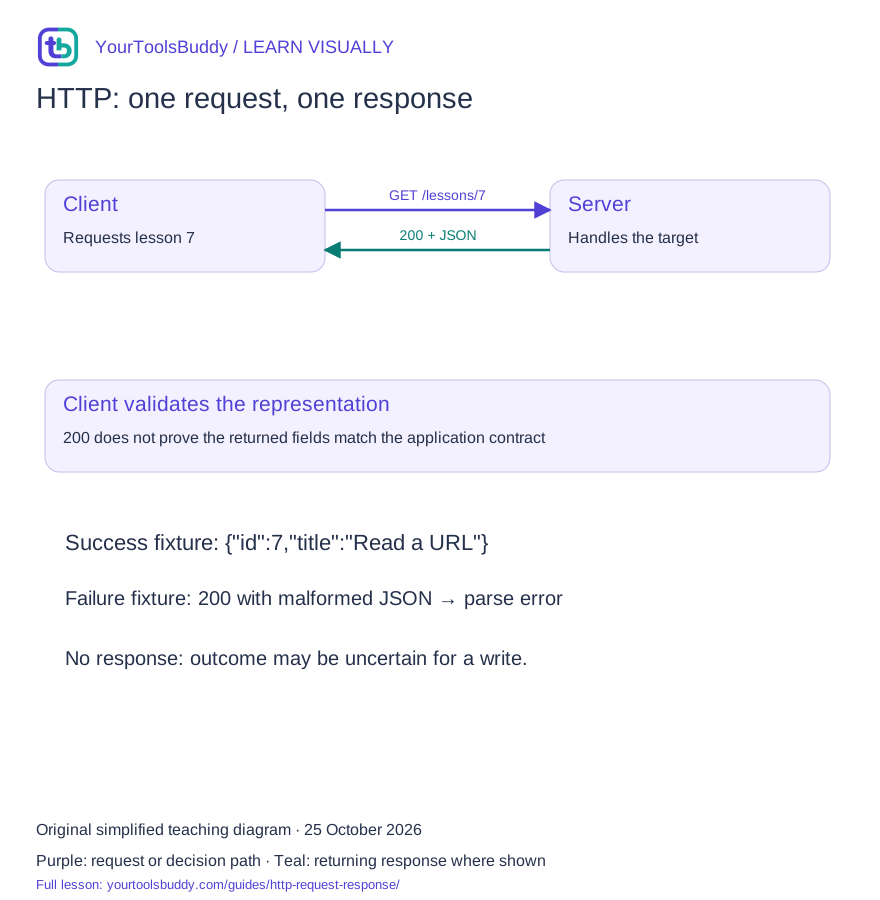
The diagram’s relationships are explained in the readable cards below. Open the full-size SVG to zoom.
Download branded diagram (SVG)Read the diagram
Purple arrow: request to server. Teal arrow: response to client. These are separate directions.
Client
Chooses a method and target
Request
GET /lessons/7
Server
Processes the request
Response
200 and a JSON representation
Client check
Validate the returned lesson
What you will learn
Read the method, target, status and representation in a small HTTP example and separate transport success from application success.
Prerequisites: comfortable reading a web address. No programming is required for the explanation.
Describe what is requested
In the fictional request GET /lessons/7, GET asks to retrieve a representation of the target resource. Headers can supply more context. HTTP/1.1 text examples are convenient for teaching; HTTP/2 and HTTP/3 use different framing.
Interpret the response
A 200 response indicates successful handling in the semantics of the request. A Content-Type field tells the recipient how to interpret the representation. Our fixture returns JSON with an id and title; those fields belong to our fictional application, not to HTTP itself.
Check more than the number
A response with status 200 can still contain the wrong application fields. A client should handle parsing errors and validate the shape it expects. Conversely a 404 describes the target resource result; it does not mean that every part of the server is down.
Handle uncertain outcomes
A network failure can leave a client without a response. For a state-changing operation, lack of a response is not proof that no change happened. Retry design depends on method semantics and the service contract. Our read-only lesson does not demonstrate a safe payment retry.
A green status can still hide a broken lesson
Picture a small lesson app that requests lesson 7. The server returns status 200 and a JSON object. The page still shows an empty heading. A support message saying the request succeeded is technically incomplete: an HTTP response arrived, but the application did not obtain the title it expected. The practical task is to inspect the method and target, the response status and fields, and the data separately. Each answers a different question about what happened.
Our fictional service accepts GET /lessons/7 and returns an object with id 7 and a title. This is an invented teaching contract, not a public endpoint or a captured exchange from a real account. We use it because a tiny example makes the boundaries visible. If you can explain why a 200 response containing the wrong fields is still unusable to this app, you understand more than a list of status-code definitions would teach on its own.
Begin an investigation by preserving what the app requested and what it received. Do not rewrite the failure as a server outage, a browser bug, or an authentication issue before checking the evidence. A useful first note says that lesson 7 was requested, a response arrived with a particular status and media type, and the expected title was missing. That note points toward a reproducible application-contract problem while leaving room for the evidence to change the diagnosis.
Read a request as a question with context
In GET /lessons/7, the method supplies request semantics and the target identifies the resource. Headers can add context, such as which representation the client can accept. A request body can carry content when the operation defines a use for it. These pieces should not be taught as interchangeable containers. A server might reject the method at that target, require a different media type, or accept the message but reject the application's input values.
Consider two fictional operations: retrieving lesson 7 and creating a saved reading list. They have different effects and different failure consequences. Repeating a read is not equivalent to repeating a request that creates another list. Before designing retries, identify the operation's semantics and the service's guarantees. An interface that hides the request behind a button still needs this reasoning. The user sees one click, but the software may send several messages if its retry policy is careless.
HTTP/1.1 text is convenient for explaining a message, but it is not a universal picture of bytes on every connection. HTTP/2 and HTTP/3 use different framing while preserving the relevant semantics. Our diagrams describe the logical request and response, not a packet capture or a timing guarantee. Similarly, a single page can request many resources. The document, styles, scripts and images need not arrive in one response just because they appear together on the screen.
Separate the status, representation and application data
For our lesson read, a 200 response indicates successful handling under the method's semantics. The Content-Type value tells the recipient how to interpret the representation, such as application/json. The JSON fields belong to our fictional app. HTTP does not define that every lesson object must have a title or that id 7 must be an integer. The application contract and validation supply those requirements. This division is why a transport-level success can coexist with an application-level failure.
Imagine three saved response fixtures. The first is valid JSON with id 7 and title 'Read a URL'. The second is the text of an HTML sign-in page. The third is valid JSON with an error field but no title. Merely calling a JSON parser will fail on the second and may succeed on the third. A successful parse does not prove that the third object is a lesson. The client needs to validate the shape it actually relies on.
Write down a small acceptance rule for this exercise: the value must be an object, id must equal the requested identifier, and title must be a nonempty string. This is a deliberately narrow teaching contract, not a universal schema for lesson services. It catches both the wrong object and the wrong lesson. If your app needs additional fields or permits different representations, its checks should reflect those requirements rather than copying the exercise's rule without thinking.
Follow one successful exchange carefully
The client selects lesson 7 and constructs a read request. The service finds that record, returns an appropriate status and media type, and sends the fixture representation. The client checks the response, parses the content, validates the expected fields, and only then renders the title. Keeping those steps explicit helps you place error handling correctly. A parse failure belongs after receiving a response; a missing response belongs earlier; a wrong id belongs in application validation.
Now introduce a display failure after validation succeeds. Perhaps the component reads lesson.name while the contract provides lesson.title. The request and returned data can both be correct while the screen is wrong. Preserve that distinction in a bug report. Otherwise, a frontend field-name error can trigger unnecessary changes to the server or network configuration. A step-by-step account makes the investigation smaller: the validated object contained the correct title, but the rendering code selected a different property.
A successful demonstration should include its expected result. For this fixture, the visible title should match 'Read a URL' and the selected id should remain 7. Do not describe a generic 200 in the console as a complete test of the user journey. If the purpose is to let a reader open a lesson, the check must reach that outcome. For a saved-file workflow, it would need to inspect the saved output instead of stopping at an on-screen success message.
Distinguish the failures before choosing a repair
A 404 says something about the target resource result; it does not establish that every function of the server is unavailable. In our scenario, /lessons/7 could be missing while /lessons/8 works. A 403 indicates that the server refuses to fulfill the request, but the exact access issue still depends on the service. A 500 is a server error response, not the same observation as a network timeout in which no HTTP response reaches the client.
With the Fetch API, an HTTP error status generally still produces a Response object; code needs to inspect its status or ok value. A rejected fetch and a response with status 404 are different branches. This matters for user messages. Telling a reader to check their internet connection after the server clearly reported a missing lesson is unhelpful. Telling them the lesson does not exist after a network failure is equally unsupported. Give the message your evidence permits.
Malformed or unexpected content forms another branch. A response can claim JSON but contain text that cannot be parsed. It can parse correctly but fail the lesson schema. It can satisfy the schema but contain stale information. Each additional check narrows the claim you can make. Avoid collecting all of them into a single catch block that invents a detailed diagnosis. It is better to report that the response could not be used and retain a safe diagnostic reason for investigation.
A timeout is an uncertain outcome for a write
Change the fictional task from reading a lesson to saving a reading list. The server may finish creating the list just before the response is lost. From the client's perspective, no response arrived. It would be wrong to conclude that nothing happened and blindly repeat the creation request. The difference between an unsuccessful observation and a proven unsuccessful operation is central to safe retry design. The user interface should not hide that uncertainty behind a cheerful automatic loop.
An application can use operation identifiers, idempotency mechanisms or a reconciliation query when its service contract supports them. Those are application design choices that need documented behavior; inventing a random header does not make a write safe to retry. For our beginner example, the responsible next step is to check whether the list exists through the supported workflow before repeating an uncertain creation. We are illustrating a decision, not prescribing a production transaction protocol.
For a read-only request, retries may still have costs: extra work, rate limits, delay and confusing logs. Use bounded behavior appropriate to the service instead of retrying forever. Preserve cancellation when the user moves away from the page. A good reading experience includes an understandable loading state, a recoverable failure and a way to try again. Those interface choices matter because the reader should be able to distinguish waiting from a result that the app has already rejected.
Use browser tools to ask one precise question
For a permitted local or public test, open the browser's network panel and trigger the action once. Locate the specific lesson request instead of assuming the first red row explains the failure. Record the target, method, status, content type and relevant response fields. Compare them with the contract the app expects. Do not copy cookies, authorization values or private response content into a public bug report. Synthetic fixtures are often enough to demonstrate a structural mismatch without exposing an account.
Suppose the request target is /lessons/undefined. That is evidence that the wrong identifier reached request construction. It is usually more useful to investigate how the selected lesson id was passed than to edit the server's 404 handling. Suppose the target is correct but the response contains a different id. The investigation moves toward routing, lookup, caching or contract behavior. The observations choose the next question; a generic status-code chart cannot make that decision for you.
When comparing two attempts, control the input. Keep the same lesson, account context and action where appropriate, and record any intentional change. A fresh login, a changed query, a disabled cache and a new server version can all alter the result. If you change them together, a successful retry tells you little about the original cause. A useful troubleshooting note preserves the smallest difference that explains the outcome while acknowledging what has not yet been checked.
Practice: decide which result the app may display
Assume the lesson contract requires id 7 and a nonempty title string. Response A has status 200 and body {"id":7,"title":"Read a URL"}. Response B has status 200 and body {"message":"Please sign in"}. Response C has status 404. Response D never reaches the client. Which result may become a lesson heading? Only A meets the stated success rule. B is parseable JSON but not the expected lesson; C and D describe different failures.
Now change A's id to 8 while leaving the title plausible. A client that validates only the existence of a title could silently show the wrong lesson. The requested identifier is part of the acceptance rule for a reason. Next, change the title to an empty string. The object still has the expected property name, but it does not provide a usable heading. This exercise shows why validation should be designed around actual use, rather than checking only that JSON parsing succeeded.
Write a helpful reader-facing message for B without revealing private diagnostics. 'We could not load the expected lesson. Please sign in through the normal account flow if this service requires it, then try again' might fit a service with a confirmed authentication requirement. Without that confirmation, avoid guessing. Internally, record that the received object lacked the required lesson fields. Public messages and diagnostic records can serve different audiences while staying consistent about what is known.
Carry the distinction into your next debugging task
When a web feature fails, ask in order: what operation was requested, did a response arrive, what does its HTTP status mean here, can its representation be parsed, and does the application data meet the expected contract? Then check the user-visible outcome. You do not need to become a protocol expert to use this sequence. It turns one vague complaint into a small set of questions that can be answered with concrete evidence.
Keep the lesson's limits in view. We have not demonstrated authentication security, TLS negotiation, cross-origin browser policy, streaming, proxy behavior or a production retry strategy. We have demonstrated how to keep message success separate from usable data. That distinction prevents several common mistakes: displaying an error object as a lesson, treating a 404 as a disconnected internet connection, or repeating an uncertain write because the first response was lost.
The same reasoning applies outside a lesson app. A file converter can return a response while producing an unusable file; a search endpoint can return valid JSON with the wrong shape; an upload can finish while its confirmation disappears. Define what the user actually needs, inspect the evidence at each boundary, and state the remaining uncertainty. A green request row is a useful observation. It becomes a successful workflow only when the expected result has also been checked.
What this lesson leaves out
This is a message-semantics overview, not a packet capture, TLS tutorial or full status-code catalog. Illustrative headers omit wire details.
A worked example you can check
Input
GET /lessons/7
Local Response: 200; Content-Type: application/json
Body: {"id":7,"title":"Read a URL"}
Expected result
JSON parsing returns { id: 7, title: "Read a URL" }. Check fields separately against the application contract.What if it fails?
Status 200 with body {broken still fails JSON parsing. A status code alone cannot validate application data.
Original synthetic teaching fixture. No remote connection or real account is used.
Check the response body separately
A successful HTTP status does not tell you whether a body is valid JSON. Paste this fictional lesson response into the JSON formatter and choose Format JSON.
Paste this sample
{"id":7,"title":"Read a URL"}Compare your result
{
  "id": 7,
  "title": "Read a URL"
}
Remove the closing brace and try Format JSON again: the tool should report invalid JSON. Restore the brace to recover. Valid syntax still does not verify the server, HTTP status or your application’s required fields. This exercise sends no HTTP request.
Inspect the sample JSON body →References
Sources used to check the explanations and examples are listed below.
Found a mistake? Send a correction with this lesson’s title, URL and disputed detail. No login needed.
Continue learning
Read a URL before you share it →
DNS: finding an address without fetching a page →
All visual lessons and practical guides →