
LEARN VISUALLY · Web basics
Read a URL before you share itExplained visually
Identify the hostname, path, query and fragment in an HTTPS URL without treating its appearance as proof of safety.
A link is more than a website name. Its parts answer different questions: which host, which resource, which parameters and which client-side location? Start by separating those questions before editing or sharing a link.
Jump to a section
The big picture
Open full-size diagram ↗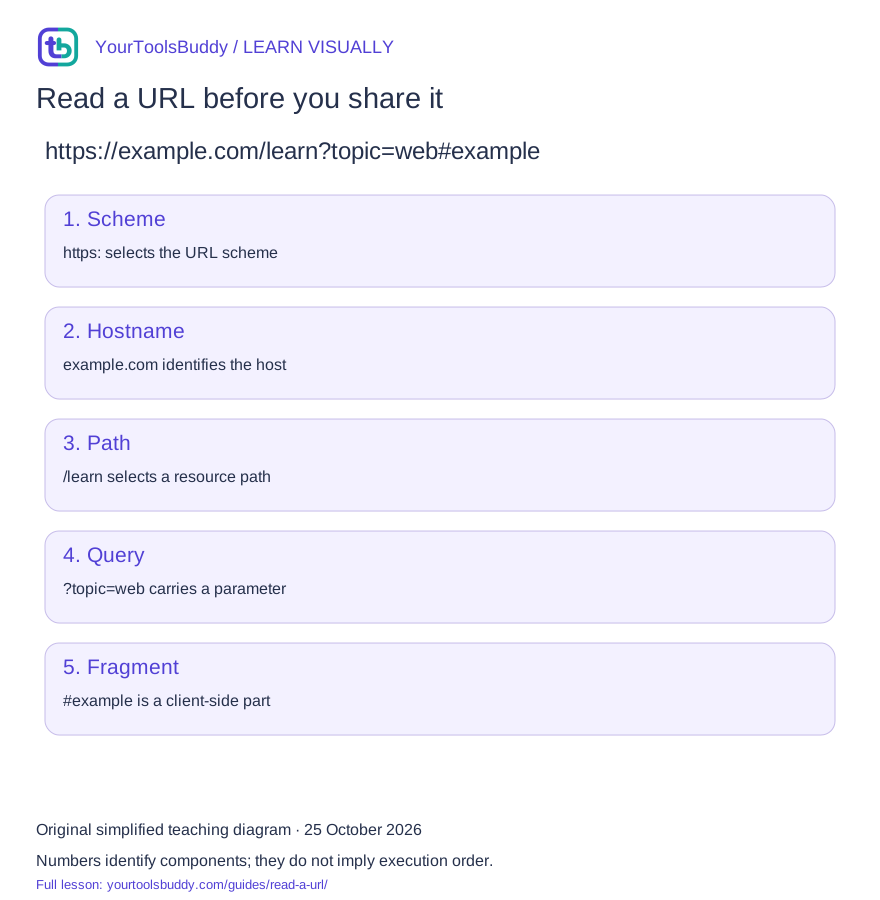
The diagram’s relationships are explained in the readable cards below. Open the full-size SVG to zoom.
Download branded diagram (SVG)Read the diagram
Reading order only. These are URL components, not network steps.
Scheme
https: selects the URL scheme
Hostname
example.com identifies the host
Path
/learn selects a resource path
Query
?topic=web carries a parameter
Fragment
#example is a client-side part
What you will learn
Identify the hostname, path, query and fragment in an HTTPS URL without treating its appearance as proof of safety.
Prerequisites: comfortable reading a web address. No programming is required for the explanation.
Find the host first
In https://example.com/learn?topic=web#example the hostname is example.com. A familiar word in a path or query does not make it the hostname. A path is an application resource identifier; it need not map to a physical folder. An explicit port can also follow the host.
Separate query from fragment
The application decides what a query parameter means. The fragment is excluded from the HTTP request target, but page scripts can read it. Avoid putting secrets in either place. HTTPS protects the connection under its security assumptions; it does not certify the honesty of the site.
Change representation deliberately
Our synthetic query value is tea & coffee. Component encoding yields tea%20%26%20coffee; form-style URLSearchParams serialization uses tea+%26+coffee. In that form convention a literal plus must be encoded as %2B. Encoding is reversible representation, not encryption.
Catch a common failure
An invalid absolute URL such as https:// is rejected by the JavaScript URL constructor. A successful parse only establishes syntactic interpretation. It does not check reputation, ownership or whether the resource exists.
Start with the question the address must answer
Imagine a colleague sends you a lesson link before a meeting. You want to know three things: which site will receive the request, which lesson is being requested, and whether the address contains anything that should not be shared. Reading the address in that order is more useful than trying to memorize every punctuation mark. The same habit helps when a copied link opens the wrong search, loses a filter, or sends someone to a sign-in page instead of the intended resource.
Use this fictional address throughout the walkthrough: https://example.com:8443/learn/http?level=beginner&topic=web#practice. The scheme is https, the hostname is example.com, and the explicit port is 8443. The path is /learn/http. Two query entries select level and topic, while the fragment names practice. These pieces have different jobs. Changing one can affect the destination, the requested resource, or what the page displays after it loads. The example is an address to inspect, not a promise that a lesson service exists at that location.
Before editing a link, decide what you are trying to preserve. For a lesson recommendation, the specific topic and section may matter. For a public support message, a private search term may need removing. For a broken-link report, removing every parameter can destroy the evidence needed to reproduce the problem. A good decision starts with the purpose of the link, not a blanket rule that long URLs are bad or short URLs are safe.
Read the destination before the decoration
Compare https://example.com/learn with https://example.net/example.com/learn. In the first address, example.com is the hostname. In the second, the same text appears inside a path on example.net. The recognizable wording has not moved the request back to example.com. This distinction matters because links often contain document titles, customer names, or familiar service names outside the hostname. A reassuring word somewhere in the address is not enough to identify its destination.
Now inspect https://[email protected]/lesson. In this deliberately misleading teaching address, example.com occupies the username position and training.example.net is the hostname. Do not teach yourself to identify a site by the first domain-like string you see. A URL parser can separate those fields, but a parser cannot decide whether the intended recipient is trustworthy. For a sensitive task, use a known bookmark or independently confirmed address rather than following a surprising link solely because it contains familiar text.
An explicit port is also part of the connection choice. The same hostname with port 8443 is not interchangeable with every other port on that host. An application may listen there, or the connection may fail. You do not need to memorize port assignments to notice an unexpected one. Ask why it is present and whether it matches the instructions for the service you meant to use. Our walkthrough identifies structure; it is not a complete security assessment of that service.
Follow the request and the page separately
For the example address, the browser can request the path and query /learn/http?level=beginner&topic=web from the selected origin. The fragment #practice is excluded from the HTTP target. It may tell the browser to move to a matching section, and page code can also interpret it. This explains why two links can fetch the same resource but land the reader at different places. It also explains why a server log of the HTTP target does not, by itself, show the fragment the reader used.
Do not turn that observation into the rule that fragments are private. A page can read its own fragment and send information elsewhere. A screenshot can expose it. A copied address can carry it into a message or shared document. Treat the whole address as information you are giving to the next recipient. If the address contains an access token, email address, internal customer identifier, or confidential search, stop and check the sharing workflow rather than guessing that a particular separator makes it harmless.
The path is an identifier interpreted by the application. A route ending in /learn/http does not establish that the server stores an actual folder called learn containing a file called http. Our own lesson scenario could retrieve a database record and generate a page at that path. This makes a useful debugging distinction: a missing page may be a routing or application-data problem even when there is no corresponding file to inspect. The shape of a URL does not reveal the whole implementation behind it.
Build a search value without breaking the query
Suppose the reader wants to search for tea & coffee. Concatenating '?q=' with that text produces an ambiguous query because the ampersand also separates query entries. The intended value needs representation as one value. In JavaScript, create a URL object and set searchParams.set('q', 'tea & coffee'). For our synthetic example, its form-style serialization is q=tea+%26+coffee. Reading searchParams.get('q') returns tea & coffee again. The round trip is the important check: the text the reader entered survives as one value.
The percent signs do not mean the value has been encrypted. They represent characters in an encoded form. Someone who receives the link can often read the decoded value, and software processing the request may record it. Use query values for information the application is designed to accept in an address. Do not improvise a password-sharing method by encoding a secret and assuming the result is concealed. A reversible transformation changes representation, not who is authorized to read the information.
A literal plus sign is a useful boundary case. When a form-style parser interprets q=C++, those plus signs can become spaces. Setting the value C++ with URLSearchParams instead produces q=C%2B%2B, preserving both plus signs. This is why examples should include punctuation rather than only a simple word such as web. Simple inputs can make a broken construction method look correct. Test the characters your readers actually need, including spaces, ampersands, plus signs, and non-ASCII text where the application supports it.
Avoid fixing one link by damaging another
Encoding an entire assembled URL as though it were a single query value can obscure separators that need to remain structural. Encoding one value twice can instead turn an existing percent sign into %25. For instance, tea%20coffee becomes tea%2520coffee after another component-encoding pass. The receiver may then see the literal text %20 where a space was intended. If a link looks increasingly full of percent signs after each edit, inspect where construction and decoding occur rather than adding another decode operation at random.
Use the operation that matches the component you are changing. For a query field, set that field through the URL API. For a relative link, resolve it against the intended base. Starting from https://example.com/learn/http/, ../dns resolves to https://example.com/learn/dns. Starting from a different base can produce a different answer. An address copied out of a document may work inside that document but fail in a message if its base is lost. Include a complete address when the recipient will not have the original context.
Do not assume that every application treats query order, repeated names, letter case, or trailing slashes as interchangeable. The parser can expose two q entries; the application decides whether that is valid and which values it uses. A cleanup tool that sorts or deletes parameters may change a signed or application-specific link. If you are troubleshooting an address you did not construct, preserve an original copy and make one deliberate change at a time. A cleaner appearance is not evidence of equivalent behavior.
Troubleshoot with a small comparison
Consider a support report: the first link opens a filtered lesson list, while a second opens the unfiltered directory. Put the addresses beside each other and compare hostname, port, path, query, then fragment. If the path matches and the second link lacks topic=web, the missing parameter is a useful lead. It is still a hypothesis. Confirm what the application expects and try the exact comparison in a safe test environment. Do not declare a network outage merely because an application ignored a parameter.
A different report says that a section link opens the right article but stays at the top. The request may have succeeded while the fragment no longer matches an element in the page. Check whether the section was renamed, whether the copied address lost its # portion, and whether the page implements that kind of navigation. This is a narrower problem than a missing article. A useful bug report includes the complete example address, expected section, actual result, and the browser used, with private values removed safely.
If new URL('https://') throws an error, the input cannot be interpreted as the intended absolute HTTPS URL. If new URL('https://example.com/missing') succeeds, the parser has only constructed a URL object. It has not contacted the server or verified that /missing exists. Keeping those outcomes separate prevents a common mistake in link validators: treating syntactic success as evidence of availability. Availability, access permission, and content suitability each need a different check.
Practice: repair a shared search
Here is an original desk exercise. A teammate wants a link to search for C++ & web on https://example.com/learn, then jump to a section named results. They propose https://example.com/learn?q=C++ & web#results. Before changing anything, write down the intended hostname, path, complete search value, and fragment. The intended search contains two plus signs, spaces and an ampersand. Those characters make this a better test than a search for a single letter.
Construct the link by setting q to C++ & web through URLSearchParams and the hash to results. The query representation should be q=C%2B%2B+%26+web. Parse the finished address again and check that get('q') returns the original text. The fragment should still identify results, and the hostname should still be example.com. If any of those assertions fails, the repair has changed meaning. The expected result is a correctly represented address, not a successful search against a real endpoint.
Now imagine the same search contains a customer's email address. Correct encoding does not settle whether it is appropriate to post the link publicly. Separate the construction question from the disclosure question. Use a fictional replacement when reporting the bug, or use the application's approved sharing feature if it supplies a safe public link. The practical habit is to check both meaning and exposure before sharing, rather than treating the address as an opaque string that must be copied exactly in every context.
A checklist you can use immediately
Before opening an unfamiliar address, identify the actual hostname and check that it matches the destination you intended. Notice unexpected ports and embedded user information. Treat HTTPS as a connection property, not a recommendation of the operator. For sensitive tasks, obtain the address from a source you already trust. These steps improve your understanding of the link; they do not cover every phishing technique, redirect, internationalized-name issue or compromised website.
Before sharing, ask whether the path and query reveal private information and whether the recipient needs the current filters or section. Before editing, save the original and change one component deliberately. After constructing a parameter, parse it back and compare the value, including punctuation. When reporting a failure, distinguish parsing, reaching the service, authorization, and finding the expected content. Those are four different questions, even when the browser shows only one disappointing result.
The most useful outcome of this lesson is a more precise conversation. Instead of saying that a link is wrong, you can say that its hostname differs, its query lost a literal plus, or its fragment names a section that no longer exists. That description gives the next person something concrete to investigate. It also helps you avoid a risky repair, such as deleting the whole query or decoding an address repeatedly without knowing what the application expects.
What this lesson leaves out
This overview covers a simple HTTPS URL, not every URL scheme, internationalized-domain risk or phishing technique. User information, IPv6 literals and explicit ports need separate treatment.
A worked example you can check
Input
https://example.com/learn?topic=web#example
Expected result
hostname: example.com
pathname: /learn
topic: web
fragment: #example
encodeURIComponent("tea & coffee"): tea%20%26%20coffee
URLSearchParams: q=tea+%26+coffee
What if it fails?
new URL("https://") throws a TypeError. Parsing a link does not establish that it is safe.
Original synthetic teaching fixture. No remote connection or real account is used.
Try encoding one query value
Suppose a search term contains an ampersand. Encode the value on its own before putting it into a query; encoding a complete address would also change its separators.
Paste this sample
tea & coffee
Compare your result
tea%20%26%20coffee
Choose Encode in the URL component tool, then Decode the result and compare it with the original. A literal + stays + when decoded here; this tool does not apply form-style plus-to-space conversion. Encoding does not encrypt a value or check whether a destination is safe.
Practice URL component encoding →References
Sources used to check the explanations and examples are listed below.
Found a mistake? Send a correction with this lesson’s title, URL and disputed detail. No login needed.
Continue learning
DNS: finding an address without fetching a page →
HTTP: one request, one response →
All visual lessons and practical guides →