
LEARN VISUALLY · Web architecture
Forward proxy vs reverse proxy: whose side is it on?Follow two separate connection boundaries
Compare a client-side intermediary with a service-side intermediary, including TLS termination, forwarded headers and what proxy logs do not prove.
Two diagrams both say browser → proxy → server. One represents a company’s outbound connection policy; the other is the public entrance to a website. The arrows look similar, but the proxy represents a different side.
Jump to a section
The big picture
Open full-size diagram ↗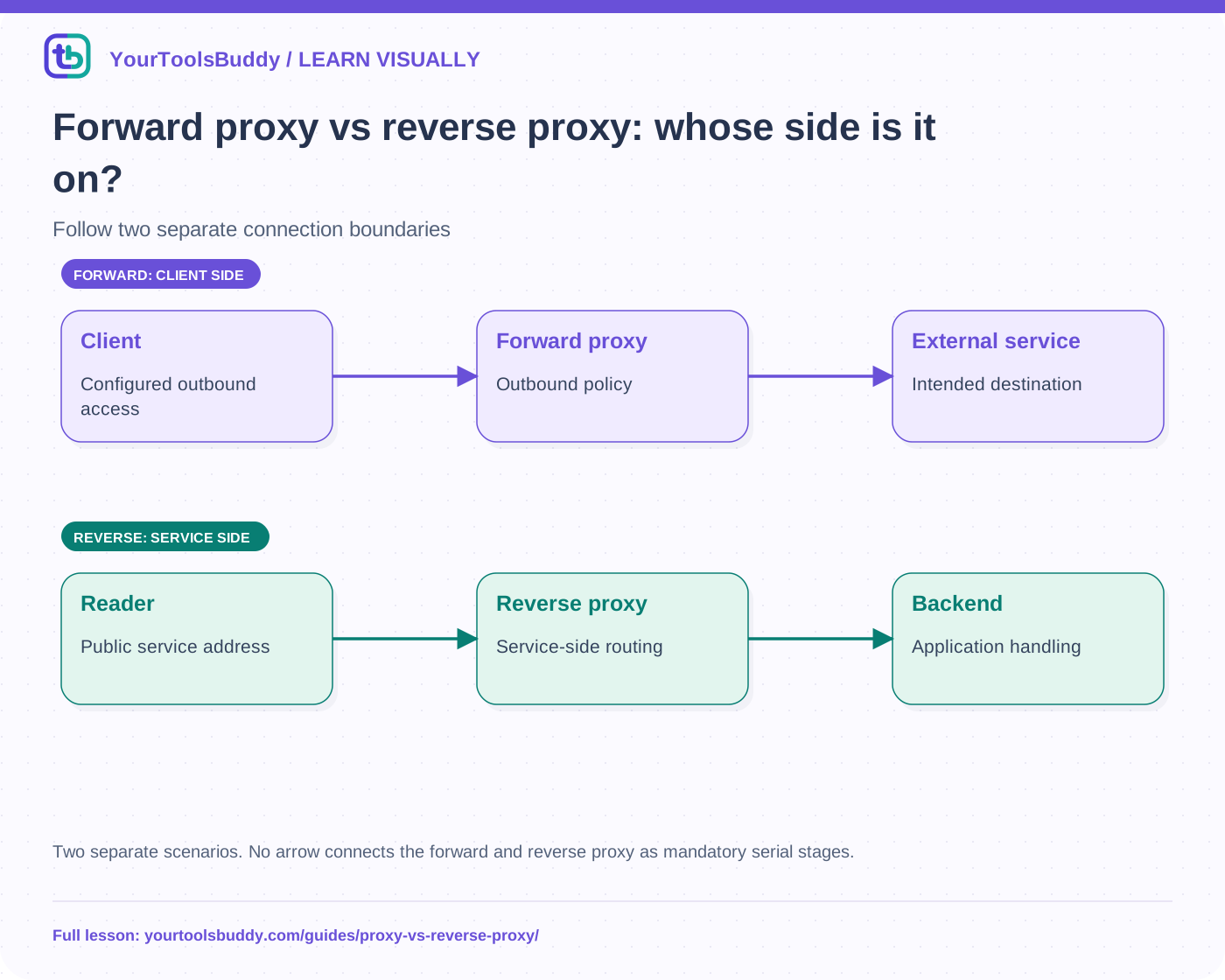
The diagram’s relationships are explained in the readable cards below. Open the full-size SVG to zoom.
Download branded diagram (SVG)Read the diagram
Two separate scenarios. No arrow connects the forward and reverse proxy as mandatory serial stages.
Client team
Chooses an outbound intermediary
Forward proxy
Applies outbound access policy
Reverse proxy
Fronts the public service
Application
Handles routed upstream request
A forward proxy acts in an outbound path
In the first fictional arrangement, a team configures clients to send eligible outbound requests through an intermediary before reaching external services. That intermediary can apply access policy, routing or other configured behavior. How traffic reaches it and what it can inspect depend on the protocol and setup. A proxy is not automatically a VPN, nor proof that all device traffic uses the same path.
Ask who configured it and which destinations it may contact. A working proxy setting in one application does not establish that every other app uses it. Avoid treating “behind a proxy” as a complete description of a device’s network or privacy posture.
A reverse proxy fronts a service
In the second arrangement, readers contact library.example, and a service-side reverse proxy forwards eligible requests to application servers. The reader uses the service’s public address rather than choosing one of its internal backends. The operator can route /lessons/ to one application and /images/ to another, if that is how the system is configured.
A reverse proxy can also perform load balancing, but the terms describe different aspects. Reverse proxy describes the intermediary’s position and role; load balancing describes distribution among eligible backends. A reverse proxy with one upstream is still a reverse proxy, even though it is not sharing requests across several application machines.
Draw TLS as connections, not decoration
If the reverse proxy terminates TLS, the protected browser connection ends there. It then establishes its own upstream connection, which needs its own protection policy. A padlock on the browser’s connection does not prove encryption on every internal hop or the honesty of the operator. The proxy may be able to read application content at that termination point.
Forward-proxy HTTPS behavior also depends on configuration. Tunneling and explicit interception are different arrangements. This introductory diagram does not imply that every proxy can read all HTTPS payloads. Identify the actual TLS endpoints before making a claim about who sees what.
Preserve the intended request meaning
An intermediary can change how a path or header reaches the backend. In NGINX, for example, URI handling depends on the proxy_pass configuration. Copying a trailing slash from another example without understanding it can route a valid public path to an unintended upstream path. Verify the application’s observed target as well as the public address.
The original client address may be represented through forwarded metadata, but an application must define which intermediaries it trusts. An arbitrary internet client can supply a header too. A header that looks like a client IP is not automatically reliable identity or proof of authorization. Trust is a configured boundary, not a property of the header’s spelling.
Walk through the route fixture
Our executed fixture uses no proxy server. It applies a small explicit routing policy to synthetic paths: /lessons/7 maps to app-a, /images/a.svg maps to asset-b, and an unsupported path is rejected. A separate forward-proxy policy allows a fictional documentation host and rejects an unapproved host. The comparison demonstrates different policy questions without claiming network forwarding or TLS inspection was tested.
The useful failure is a tempting fallback: sending every unrecognized request to an arbitrary host supplied by the caller. Our fixture rejects that case. A real open-proxy or server-side request problem needs a fuller security review; this small allowlist is not a production security library.
Troubleshoot each hop separately
Check the client-facing request, intermediary response and upstream request. Record path, method and safe diagnostic fields. A backend failure, proxy timeout and client network failure are different observations. Logs may contain private URLs or authorization data, so use synthetic samples when sharing a report.
Limits and choosing the right explanation
Say which side the proxy represents, where connections terminate and what policy it applies. The label alone does not establish anonymity, caching, balancing, authentication or encryption. We omit detailed CONNECT behavior, service meshes and production header validation. The local exercise checks a route map, not an installed NGINX configuration.
Work through the checked example
Input
Reverse: /lessons/7, /images/a.svg, /unknown
Forward: docs.example, unapproved.example
Expected result
Reverse: app-a, asset-b, rejected
Forward: allowed, rejected
What if it fails?
A route-policy fixture only; no proxy, TLS termination or production allowlist was installed.
Original synthetic teaching fixture. No remote connection or real account is used.
References
Sources used to check the explanations and examples are listed below.
Found a mistake? Send a correction with this lesson’s title, URL and disputed detail. No login needed.
Continue learning
How a load balancer shares incoming requests →
HTTP vs HTTPS: what Chrome’s new warning actually protects →
All visual lessons and practical guides →