
LEARN VISUALLY · Security basics
HTTP vs HTTPS: what Chrome’s new warning actually protectsA protected connection is only one part of trust
Follow the connection boundary, understand Chrome’s HTTP warning, and test why encryption and choosing the correct destination are separate checks.
A browser warning interrupts your visit to a familiar-looking page. Follow a fictional library request to understand what the connection protects, what the website can still see, and what to check before continuing.
Jump to a section
The big picture
Open full-size diagram ↗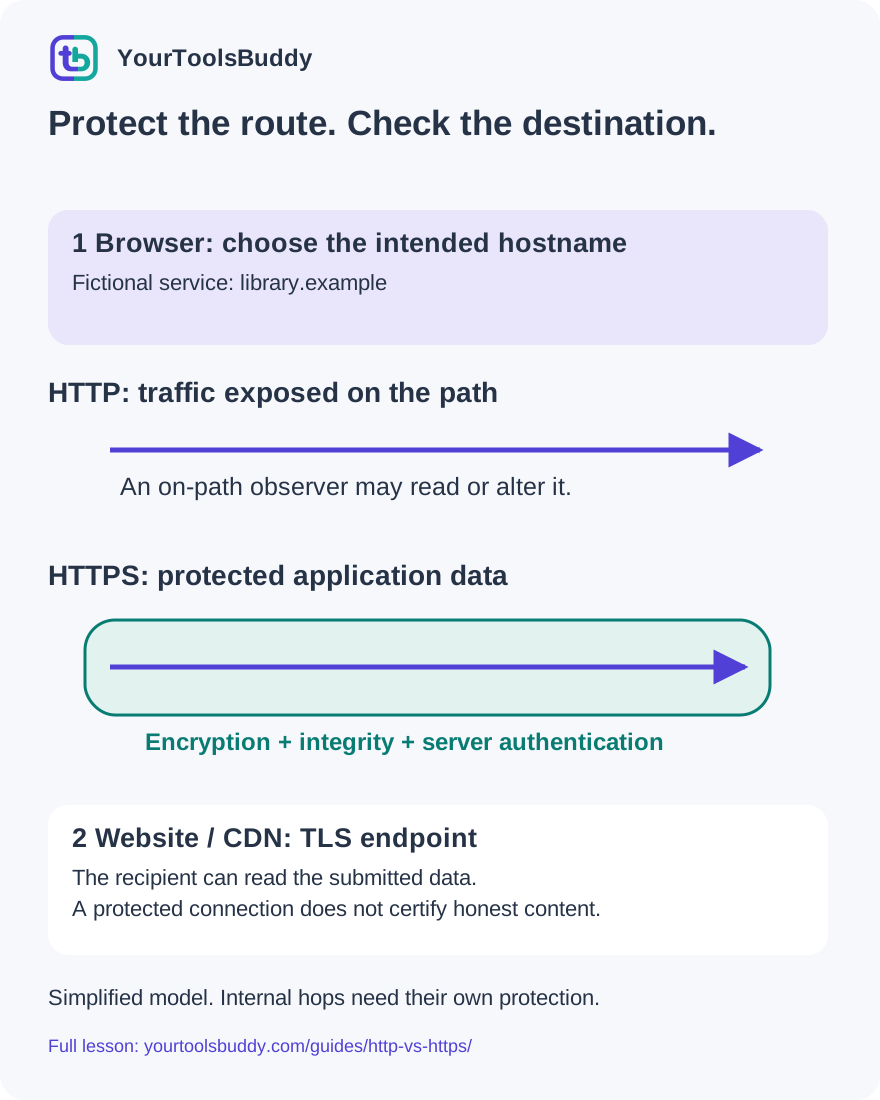
The diagram’s relationships are explained in the readable cards below. Open the full-size SVG to zoom.
Download branded diagram (SVG)Read the diagram
Simplified connection model, not a packet capture. A CDN may be the TLS endpoint; internal hops and endpoint security need their own checks.
Choose the destination
Compare the actual hostname with the service address you independently know.
Establish the protected channel
Validate authentication and negotiate connection protection before protected application data.
Send the application request
A request and response travel through the protected channel; a status code does not certify safety.
Check the endpoints too
The recipient can read submitted data. HTTPS does not certify honest content or secure storage.
Two questions before you trust a page
You open a link to a fictional library to order a notebook. The page looks familiar, but the browser pauses before loading it. Is the library dangerous? Did your computer break? Or is the browser asking about the connection rather than the business? Those are different questions, and mixing them up makes both safe and unsafe pages harder to recognize.
Start with two checks. First, can the browser establish the intended protected connection to the destination? Second, is that destination actually the service you meant to use, and is its request reasonable? HTTPS addresses important parts of the first question. It cannot answer the second question for you. A convincing imitation can use HTTPS while asking you to send information to the wrong organization.
In this lesson, follow one request from browser to website, compare an exposed connection with a protected one, and examine a small local encryption exercise. Then use three fictional addresses to practice a decision. You do not need to configure a server, change security settings or open an unsafe site to understand the distinction.
HTTP describes the conversation
HTTP gives clients and servers a shared way to express requests and responses. A browser might request the library catalog; the service returns a status, headers and a body. An image, stylesheet or later API call can create another request. One page therefore involves several conversations rather than a single invisible package labeled website.
The http and https schemes tell the client different things about accessing that resource. In an ordinary direct HTTP connection without transport protection, a party able to observe or interfere with the network path may read or alter the traffic. The fact that a request is only for public reading does not eliminate every risk: a changed download link, substituted instructions or injected script can still matter.
Do not confuse a successful response with a secure connection. A server can return status 200 over either scheme. That number describes the result of the HTTP request, not an audit of encryption, the business or the accuracy of the page. Our separate request-and-response lesson explains the conversation; here we focus on the channel carrying it.
HTTPS protects a channel
HTTPS uses a protected connection for HTTP communication. For the familiar browser-to-website model, TLS provides encryption, integrity protection and authentication of the server endpoint. These are related but separate jobs. Encryption limits reading by an observer on the path. Integrity checks detect unauthorized changes. Authentication helps establish that the peer is appropriate for the requested name under the browser trust system.
Our diagram draws a protected tunnel between a browser and a TLS endpoint. This endpoint may be a hosting service or a CDN that handles connections for the site. The drawing does not promise that the same connection continues unchanged through every internal server. Each later connection and each system handling decrypted data needs its own protection and policy.
Think about where the tunnel ends. When the library receives your notebook choice, it must be able to read it to fulfill the request. HTTPS does not make the data secret from the destination itself. If you intentionally send a private document to an unsuitable website, an encrypted route does not reverse that disclosure. Choosing the recipient is still your responsibility.
A simplified connection sequence
For a new protected connection in our simplified example, the client and server first establish security parameters and keying material. The server presents authentication information, and the client validates it for the intended destination. Protected application data can then carry the catalog request and response. Real TLS includes details and alternative paths that this overview leaves out.
Certificate validation is not a decorative badge added after the page loads. A client needs to reject an invalid authentication result rather than simply accept whatever a server sends. A certificate identifies a name within a trust system; it is not a review of product quality, refund practices or whether an article contains good advice.
You may also see different HTTP versions and connection reuse in real browsers. The visual sequence is a teaching model, not a packet trace from your computer. We did not record a browser handshake or test Chrome rollout behavior for this lesson. That boundary matters because a plausible animation should never be mistaken for captured evidence of a real security event.
What Chrome announced on October 21
Google announced on October 21, 2026 that Chrome had extended its insecure-HTTP permission warning to users by default, following an earlier rollout for Enhanced Protection users. The central change described by the vendor is timing: ask before making an insecure HTTP connection, rather than relying only on a passive label after exposure has already happened.
That announcement is a vendor rollout statement. It is not evidence that we tested every operating system, browser profile or managed device. The warning concerns using HTTP when a protected connection is unavailable; it should not be confused with a certificate-error page or a separate dangerous-site alert. Different problems can require different remedies.
The announcement also describes remembered approvals and exceptions, including local IP addresses and single-label intranet names. Those details explain why seeing no warning is not a universal certificate of safety. If your screen differs, consult current browser help and your organization’s administrator rather than forcing it to match a screenshot. We are explaining the boundary, not instructing you to bypass a browser warning.
A practical response to an unexpected warning
Return to the task you were trying to complete. If you intended to visit a public service, use an independently known address or bookmark and check the exact hostname. If the service offers a working HTTPS address, use that verified destination. Do not enter credentials or private information into an unprotected form merely because the page looks familiar.
If a trusted organization still provides an old HTTP link, ask it for the current secure address through a known contact route. Avoid treating a message on the questionable page as independent verification. A warning is a reason to investigate the destination and connection, not a challenge to remove until the task can continue.
For a workplace intranet or a home router, the environment may differ from a public website. An exception does not mean every nearby device is trustworthy. Use the vendor or administrator’s documented process; do not change certificate trust, disable protection or install a proposed security helper just because an unknown page requests it. This lesson makes no such changes to your computer.
Worked example: an envelope with a change detector
Here is an executed local model of confidentiality and integrity, kept separate from a real network protocol. We created a fictional message: fictional library order: notebook=blue. A Node program generated a temporary random key and nonce and used authenticated AES-GCM encryption. The expected successful result was that decrypting the unchanged ciphertext with the correct key and authentication tag returned exactly the original message.
That round trip passed. The program then changed one ciphertext byte, tried a different key, and changed the authentication tag. Each of those three attempts was rejected. These are useful failure cases because receiving some bytes is not the same thing as receiving an authenticated message. The receiver should not quietly treat altered data as a valid library order.
This program is not TLS. It does not perform a handshake, validate a certificate, inspect packets, implement browser policy or authenticate a domain. We generated only synthetic temporary data and did not touch account credentials. The result demonstrates a limited authenticated-encryption property; it cannot prove that a website is secure. A real TLS implementation requires the complete protocol and reviewed software.
Worked example: HTTPS can lead to the wrong place
Now compare three fictional URLs without visiting them. The intended address is https://library.example/catalog. A second address is https://library.example.invalid/catalog. A third is http://library.example/catalog. The reserved example names let us discuss structure without inviting anyone to a real login page. We parsed these strings locally and checked the scheme and hostname produced by the URL parser.
The first result has scheme https and hostname library.example. The second also has scheme https, but its hostname is library.example.invalid. That is a different destination. The third preserves the intended hostname but uses http. The two checks therefore vary independently: the correct-looking connection scheme does not establish the correct service, and the intended name does not supply transport encryption by itself.
The lesson is not to memorize a suspicious suffix list. Compare the actual destination with the address you independently know for the service. A logo, page title, reassuring sentence or string embedded somewhere in a longer hostname is not that comparison. Our parser exercise establishes how those particular strings are separated; it does not contact or validate certificates for any of them.
Why a later redirect is not time travel
Suppose a person starts with an HTTP address and the server replies with a redirect to HTTPS. The eventual page may use a protected connection, but the initial request was still a separate step. Protection applied later does not retroactively encrypt bytes already sent earlier. That is why preventing an insecure first connection can matter even when a site usually redirects quickly.
Browsers and sites have mechanisms to avoid that first unprotected step. For example, HSTS lets a site communicate a policy that the user agent should use secure connections for that host under specified rules. Browser upgrade behavior and preloaded knowledge can also affect what request is actually made. A typed HTTP string does not prove an HTTP request went onto the network.
When explaining a real case, separate the address entered, any browser upgrade, any network response and the final page. Our lesson does not run a redirect experiment or assert which mechanism a particular browser used. For a site you maintain, test the real redirect and policy behavior in an appropriate environment; do not infer it solely from the final address bar.
A protected page may request other resources
Imagine the catalog HTML is delivered securely, but it refers to a script at an HTTP address. That resource is another connection with its own risk. This situation is called mixed content. The visible page address alone is not a complete map of all requests used to construct and operate that page.
Browsers mitigate mixed content through blocking and upgrades, with behavior depending on resource type and context. It is inaccurate to teach that every insecure resource always loads, or that one icon tells a website owner every detail of what happened. A missing script or image may need investigation rather than a request to lower the browser’s protections.
For our fictional library, the sound design choice is to serve its page and required resources through appropriate protected connections. For the reader, the useful takeaway is narrower: avoid using a broken security warning as an invitation to disable checks. The example does not create mixed content on YourToolsBuddy or claim that we tested every resource type in a browser.
What HTTPS does not hide or guarantee
The destination can read the application data it receives, and a compromised device may expose data before encryption or after decryption. Traffic timing and size can still reveal information even when content is protected. Whether names are visible to a particular observer depends on other protocols and configuration; HTTPS alone should not be described as complete anonymity.
An encrypted connection also does not guarantee truthful content, safe downloads, appropriate privacy practices or a secure database. Those are separate properties with separate evidence. Think of ordering a notebook: a protected delivery route helps keep the order from being read or changed on the way, but it does not guarantee that the shop will ship the notebook you chose.
Use this separation when comparing security products or interpreting marketing. Ask which threat is reduced, where protection starts and ends, and what evidence supports the claim. A claim that includes everything from anonymous browsing to trustworthy sellers under one reassuring symbol is too broad to assess. No individual browser label can replace all of those decisions.
Practice: choose the boundary that failed
Question one: a fake library has HTTPS and a copied logo. Has the intended destination been verified? Answer: no. The connection may be protected to that fake site; the service choice is still wrong. Use independently known contact information or an established bookmark to find the intended destination.
Question two: an HTTP request receives a 200 response. Does that status establish encryption? Answer: no. A successful application response and a protected transport answer different questions. Check the actual connection instead of assigning security meaning to the status code.
Question three: our unchanged encrypted message decrypts correctly, but the changed ciphertext is rejected. Have we proved that Chrome’s new warning is enabled on your computer? Answer: no. We tested a local cryptographic model, not Chrome. Keeping the scope of a test precise prevents a useful demonstration from turning into a false product claim.
Question four: the browser reaches HTTPS after a redirect. Was the earlier HTTP request automatically encrypted after the fact? Answer: no. Earlier exposure cannot be undone. First determine whether an insecure request actually happened, because the browser might instead have upgraded the navigation before sending it.
A short checklist for the next unexpected page
Start with the destination. Identify the service you intended to reach and compare the actual hostname with a trusted address. Then consider the connection: read the browser’s current message, use the verified HTTPS destination where available, and pause when authentication or security checks fail. Treat an unexpected request for a password, document or installation as a separate decision requiring its own justification.
For a website owner, make the protected path work consistently across the page, resources and relevant service connections. Investigate failures rather than telling visitors to ignore them. Correctly serving content and earning a visitor’s trust involve more than enabling a certificate, but a broken protected connection is still something to fix.
Remember the diagram as three boundaries: your device, the protected channel and the destination. HTTPS helps protect the middle; it does not certify everything at either end. Use the worked examples to explain that distinction to someone else, then follow the actual browser or service guidance for a real problem. No unsafe visit or account change is needed to practice this reasoning.
References
Sources used to check the explanations and examples are listed below.
- Google Chrome: default insecure-HTTP warning announcement, 21 October 2026
- IETF RFC 9110: HTTP semantics and HTTPS scheme, June 2022
- IETF RFC 8446: TLS 1.3 properties and limits, August 2018
- Google Chrome Help: connection security and checking the site name
- MDN: TLS and server authentication
- MDN: mixed content and mixed downloads
- IETF RFC 6797: HTTP Strict Transport Security, November 2012
Found a mistake? Send a correction with this lesson’s title, URL and disputed detail. No login needed.
Continue learning
Read a URL before trusting the destination →
Understand one HTTP request and response →
All visual lessons and practical guides →