
LEARN VISUALLY · Security basics
Passkeys explained: sign in without a reusable passwordThe challenge, the device and the proof
Follow a passkey sign-in, distinguish local unlock from a remote signature, and understand website scope, replay checks and recovery choices.
A familiar fingerprint or PIN prompt can hide a very different sign-in process. Instead of typing another reusable secret into a website, you approve a credential that can answer a fresh challenge. Follow a fictional library sign-in to see which information moves, which stays local, and why recovery still deserves attention.
Jump to a section
The big picture
Open full-size diagram ↗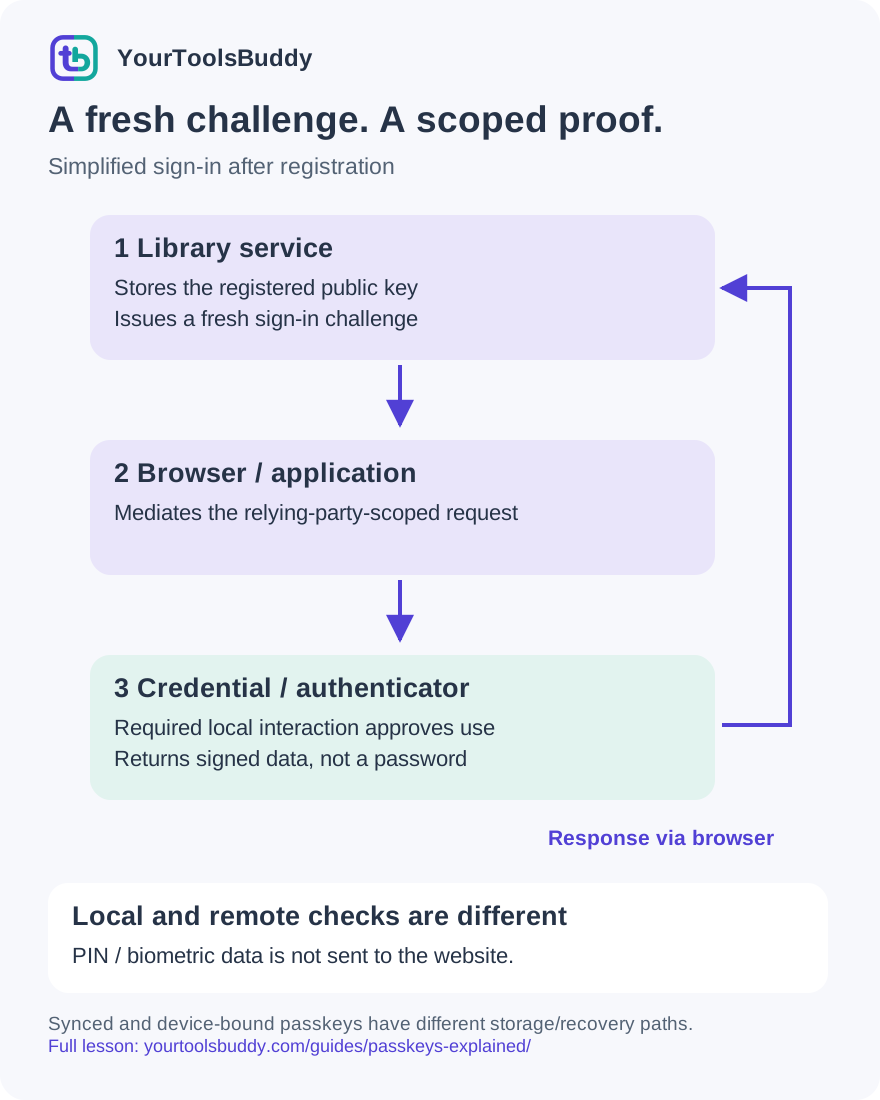
The diagram’s relationships are explained in the readable cards below. Open the full-size SVG to zoom.
Download branded diagram (SVG)Read the diagram
Simplified sign-in after registration. Arrows show challenge and response flow, not a complete WebAuthn wire format. Synced and device-bound credentials have different storage and recovery boundaries.
Start at the real service
The account already has a registered credential. The service issues a fresh challenge for an authentication attempt.
Request the right credential
The browser mediates the relying-party-scoped request. A copied logo on another domain does not create the same scope.
Approve local use
Complete the required local interaction, such as an available PIN or biometric check. The website does not receive the fingerprint image.
Return the signed response
The authenticator returns signed data for this request. The private key is not sent to the relying party; syncing, where supported, is a separate provider mechanism.
Verify the full context
Check the registered credential, signature, expected challenge, origin, relying-party scope and policy. A valid signature by itself is insufficient.
Create or refuse the session
Only a successful verified attempt establishes a session. Cancellation, invalid proof and replay must not be presented as successful sign-in.
A login problem you already know
Imagine using a library website from your laptop. With a password, you type a secret the service can check. If you reuse that secret elsewhere, a breach at another service can put this account at risk too. A convincing imitation login page may persuade you to type the same secret into the wrong place. Adding a code improves some situations, but it still leaves something a person may be tricked into handing over.
A passkey changes what proves you can sign in. The website asks for a fresh proof, and a credential under your control produces a digital signature. You do not invent another memorable password for that credential. Your familiar device-unlock step may approve its use, but that step is different from sending the website your device PIN or fingerprint.
By the end of this lesson, you should be able to explain that difference, identify the main participants, and ask sensible questions about recovery. You do not need to understand the mathematics of cryptography. You do need to keep three ideas separate: the website account, the credential used to authenticate, and the session you receive after a successful sign-in.
Two related keys with different jobs
Think of a public key as a way to check a signature, not as a second password. A corresponding private key can create a signature over particular information. The public key can verify that signature without acquiring the ability to produce the same proof for a different message. The website stores a public key and associates the registered credential with the correct account.
The phrase private key does not always mean a key permanently trapped inside one physical phone. Some passkeys are device-bound. Others are managed by a provider that makes them available through encrypted synchronization. Where the credential can be used, how it is protected and how it can be recovered depend on that arrangement. A diagram showing one laptop is a view of one sign-in, not a promise about every copy of a credential.
Neither key is a general key to decrypt all your website data. Authentication answers a sign-in question. File encryption, authorization to perform an action, payment approval and recovery are other questions. Keeping those responsibilities separate helps you avoid treating a successful passkey prompt as permission for everything that follows.
The four participants in the diagram
The person wants to access an account. The website service, called the relying party, decides which registered credentials it accepts and whether a returned proof passes its policy. The browser or application mediates the request. An authenticator or credential provider handles the credential and the required local interaction. These roles can appear inside the same device while still doing different work.
For a web sign-in, WebAuthn is the browser-facing interface used to create or request a public-key credential. FIDO also defines protocols used to communicate with authenticators. You do not need to install a mysterious add-on merely because a website mentions passkeys. The available path depends on your browser, operating system, credential provider and the service itself.
Our illustration deliberately leaves out byte-level messages, attestation decisions, extension data and transport details. Its arrows mean a request or returned result; they do not claim every implementation follows an identical screen sequence. A phone-assisted sign-in, a security key and a credential available directly on a laptop can all present different prompts while supporting the same central idea of scoped public-key authentication.
Creating a passkey is a separate event
Before a credential can authenticate a library account, it needs to be registered for that account. The website starts a creation request with its requirements and a challenge. The user agent checks the relevant context, and the chosen authenticator creates credential material with the required scope. Registration returns information the service must validate before recording the credential and its public key against the account.
That account association matters. A cryptographically valid key registered to the wrong account would still be a serious application problem. The service must protect enrollment and account changes, not simply display an attractive create-passkey button. A user also needs to understand which provider or device will hold the new credential and whether this is an appropriate device for it.
Creation is not something to practice on an account you do not control or on an untrusted shared machine. This lesson does not create a credential for your Google account or change any sign-in settings. If you decide to enroll one later, use the service's verified account-security flow and read the actual device, provider and recovery choices before confirming.
What happens during a later sign-in?
On a later visit, the service issues a fresh challenge for an authentication attempt. The browser requests an appropriate credential for the relying party. Depending on the flow, you choose an account or credential and complete the required local interaction. The authenticator produces signed data, and the browser returns the response to the website for verification.
The server checks much more than whether a signature is mathematically valid. It needs the expected challenge, an allowed origin, the correct relying-party scope, the registered credential and the applicable flags or policy. A production implementation also needs appropriate freshness, replay and session handling. In real WebAuthn, the signed input includes authenticator data and a hash of client data; it is not simply a signature over a friendly sentence shown on a slide.
If the required checks succeed, the service can establish a session. A familiar signed-in page is the result of this application decision, not the signature itself. If verification fails or the person cancels the prompt, the application should report that outcome clearly instead of pretending the sign-in happened.
Your fingerprint is not the credential sent to the site
A fingerprint, face check, device PIN or another supported method may authorize local use of the credential. The website does not need your fingerprint image to verify the cryptographic result. The local unlock mechanism and the remote proof have different jobs: one helps establish local user verification; the other gives the relying party evidence it can validate.
This is why changing the appearance of the sign-in screen is not the important innovation. A login page could draw a fingerprint icon while still asking for an ordinary password. What matters is the actual credential and protocol flow, including the relying-party binding and server validation. Look for the legitimate browser or operating-system prompt and the correct destination rather than trusting a decorative icon.
Be careful with broad statements such as passkeys always require a fingerprint. The available verification method varies. A person who cannot use a particular biometric may have another supported method, and accessibility is part of a usable authentication design. The service and authenticator determine the real requirements, not our simplified illustration.
Why the website address matters
A passkey is scoped to a relying-party identifier, commonly a domain name. In the straightforward example here, the legitimate site is https://library.example and the relying-party ID is library.example. A lookalike site at library.example.invalid is a different destination. It cannot become the legitimate relying party just by copying its name, colors and login form.
The origin and relying-party ID are related but not identical concepts. An origin includes a scheme, hostname and port. The relying-party identifier has its own validation rules and scope. Real deployments can deliberately support subdomains or related origins under specified conditions. This lesson uses an exact-origin example so the basic boundary stays clear; it does not teach a general suffix-matching implementation.
This binding is an important reason passkeys resist ordinary credential-phishing pages. It does not mean every website using HTTPS is honest. Nor does it prevent a malicious page from asking you to reveal other information, approve a separate action or install software. A stronger sign-in mechanism narrows one attack path; it is not permission to stop checking the task you are actually performing.
A small signing exercise with an expected result
To make the proof idea concrete, use a fictional library and a fresh randomly generated challenge. Our local exercise creates a synthetic P-256 key pair in a Node process. It builds a small message containing that challenge, the illustrative origin https://library.example and relying-party identifier library.example. The private key signs the message. The public key verifies it.
The expected normal result is accepted. Change the signed message after creating the signature, and verification must fail. Use a different public key, and verification must also fail. Those two checks explain a useful property: copying a valid proof does not give you a proof for arbitrary changed data or another registered key.
This exercise is deliberately not a passkey emulator. It does not invoke navigator.credentials, enroll a hardware authenticator, check a biometric, implement WebAuthn serialization or contact a real account. Its origin and challenge policy is written explicitly in the teaching program. Passing the exercise demonstrates those limited signature and validation behaviors. It cannot establish that a browser, provider or production login system is secure.
One proof must not become a reusable login ticket
The exercise keeps the issued challenge in a pending set. When the valid response is accepted for actual use, the program removes that challenge. Submit the same response a second time and the result becomes reject_challenge. The signature remains valid for the original message; the application rejects it because that challenge is no longer available for a fresh authentication attempt.
Additional local checks reject an unexpected origin, a different relying-party identifier and a challenge that was never issued. In total, the exercise checks eight outcomes: valid verification, modified message, wrong public key, wrong origin, wrong relying-party identifier, unknown challenge, first use and replay. Their expected outcomes are accepted, signature rejection, signature rejection, origin rejection, relying-party rejection, challenge rejection, accepted and challenge rejection.
This distinction is easy to miss in a diagram. Cryptography does not automatically supply every rule an application needs. The server must associate a response with the intended attempt and account, enforce its policy and create a session only after successful checks. Our small in-memory example also omits distributed storage, challenge expiration and production concurrency; it is a learning aid rather than deployable authentication code.
Plan for a lost device before it is lost
Consider two people who lose their phones. One used a synced passkey and still has access to the provider's supported recovery path. Another stored a device-bound credential only on the missing device and has no other registered sign-in method. These situations can have very different outcomes. A universal statement that losing a phone always loses access, or never loses access, is misleading.
Before relying on a passkey, find out which provider stores it, whether it is synced, what devices can use it and how that provider and the website handle recovery. Check whether another independent supported credential or recovery method is available. Read the instructions from the actual service rather than assuming every account behaves like the example you saw on a different platform.
Recovery is also a security boundary. If an attacker can bypass the strong sign-in route through a weak recovery process, the strongest diagram arrow will not save the account. Do not delete passwords, recovery codes or other working methods merely to make an account look fully passwordless. Make changes only through the service's supported process after understanding the consequences.
When the passkey option does not work
If no passkey appears, first check that you are on the intended service and account. Then check the provider or device where the credential was created, the supported browser and operating-system requirements, and whether that provider is available in the current environment. An empty chooser is not proof that your account was deleted or that passkeys are broken everywhere.
If a prompt is canceled or times out, report the incomplete sign-in. Do not repeatedly approve unexpected prompts to make them disappear. If you change devices, use the actual provider and service recovery instructions. A website may retain alternative sign-in routes, and a passkey at one service does not automatically enroll another service.
For implementers, diagnose the failed boundary instead of weakening validation until a test turns green. An origin mismatch, expired challenge, account association problem or unsupported authenticator needs a specific explanation. Production changes require the full specification and appropriately reviewed libraries. The short local signing model here is intentionally insufficient for shipping a passkey feature.
Practice: explain the outcome before revealing the answer
Question one: a fake library page copies the correct logo and asks for a passkey. Does visual similarity give it the real library's credential scope? Answer: no. The relying-party and origin boundaries come from the actual context and validation rules, not the artwork. Still treat requests for unrelated data or software installation with care.
Question two: a signature verifies, but its challenge has already been consumed. Should the example accept a second login? Answer: no. The exercise rejects the replay because successful mathematical verification alone is not a complete authentication policy.
Question three: the site receives a public key during registration. Can it use that public key to create a new valid signature whenever it wants? Answer: no. Verification and signing are different operations; the public key does not grant the private key's signing capability.
Question four: someone loses the only device holding a device-bound credential. Does this lesson guarantee recovery? Answer: no. Recovery depends on other registered methods and the service's actual policy. A useful preparation step is to identify those paths while access still works, rather than test them for the first time during an emergency.
A practical checklist to take away
When a service offers passkeys, ask five questions. Which account am I enrolling or accessing? Which device or provider will manage the credential? What website or relying party is it for? What local interaction approves its use? What supported recovery path remains if this device is unavailable? Those answers are more useful than a generic claim that a product has passwordless login.
For the diagram, keep the sequence simple: the service sends a fresh challenge; the browser mediates the request; the credential is used after the required local interaction; the service verifies the returned proof and its context before starting a session. The website should not receive a reusable password or your fingerprint image as that authentication proof.
Passkeys can remove a familiar secret-sharing step, but they do not remove the need for trustworthy devices, correct server validation, careful recovery and sensible session handling. Use the full lesson to understand the boundaries, and use the current instructions of your own service for any actual account change. Our fictional library and local signing exercise are safe ways to reason about the flow without modifying a real credential.
References
Sources used to check the explanations and examples are listed below.
- Google: passkeys during Cybersecurity Awareness Month, 8 October 2026
- W3C: Web Authentication Level 3 Recommendation, 25 August 2026
- FIDO Alliance: passkeys, sync, local verification and providers
- Google for Developers: passkeys overview
- Google Account Help: passkey requirements and account-specific guidance
Found a mistake? Send a correction with this lesson’s title, URL and disputed detail. No login needed.
Continue learning
Read a URL before trusting a destination →
Understand the request and response →
All visual lessons and practical guides →