
LEARN VISUALLY · Developer foundations
CI/CD: from a code change to a checked releasePassing tests and serving users are separate outcomes
Trace integration checks, build artifacts, release approval and public verification through a fictional workflow, including a failure that must stop deployment.
A team merges a small fix, sees a green badge and tells users it is live. The production site still serves the previous build. Follow the missing steps between source control, a build artifact and a verified public release.
Jump to a section
The big picture
Open full-size diagram ↗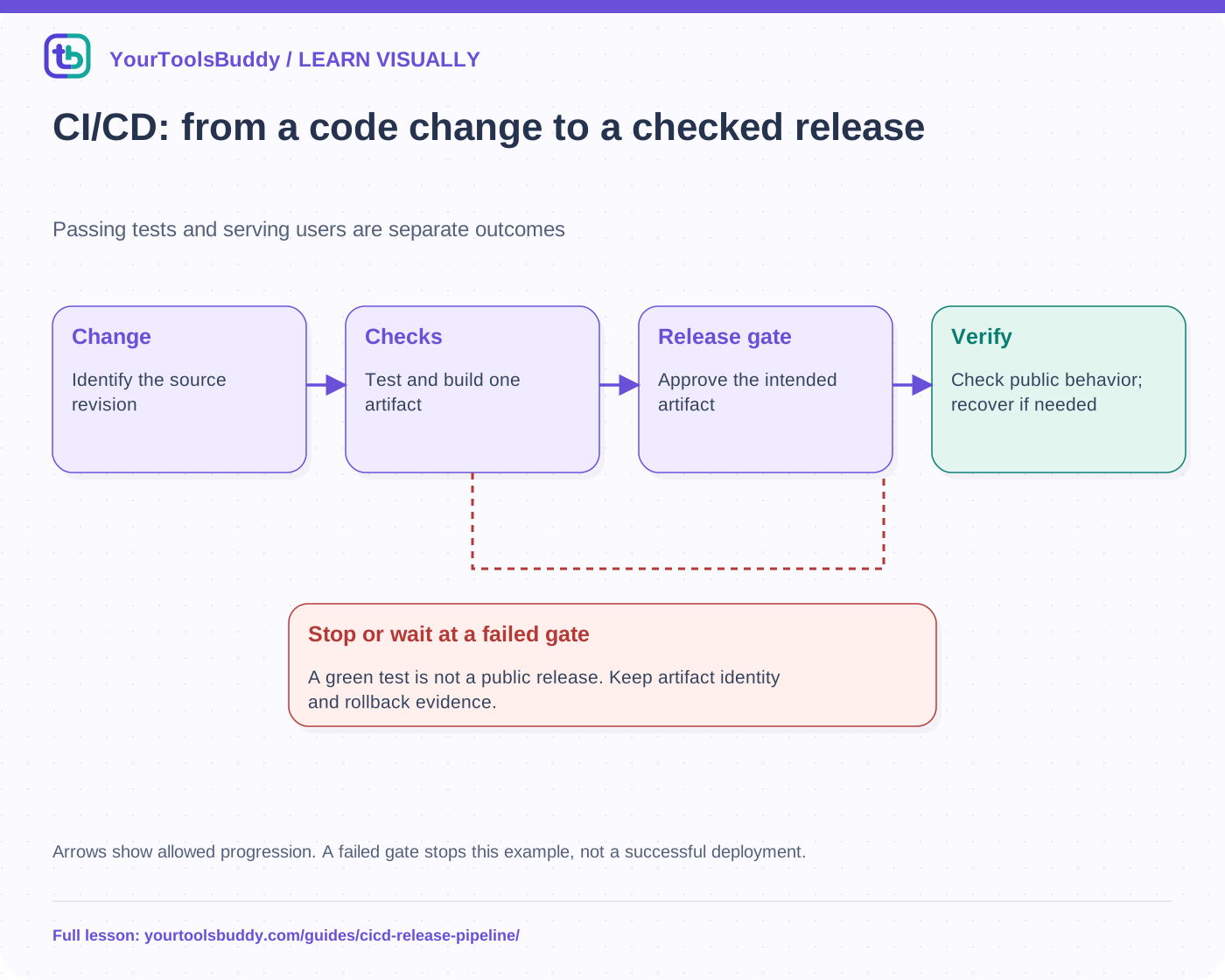
The diagram’s relationships are explained in the readable cards below. Open the full-size SVG to zoom.
Download branded diagram (SVG)Read the diagram
Arrows show allowed progression. A failed gate stops this example, not a successful deployment.
Change
Identify the source revision
Checks
Test and build one artifact
Release gate
Approve the intended artifact
Verify
Check public behavior; recover if needed
Understand what the initials promise
Continuous integration means regularly integrating changes with automated checks that can reveal problems early. Continuous delivery keeps changes ready for release through a repeatable process; continuous deployment commonly means eligible changes proceed automatically to production. Teams use the terms differently, so describe the actual gates rather than relying on an acronym to explain who approves a release.
Automation does not make a weak check strong. A test that only asserts that a process started can pass while the exported file is wrong. Define the user outcome first, then place checks where they provide useful evidence. A formatter release might need a known input and exact saved output, not merely a successful page load.
Separate workflow, job and step
In GitHub Actions, events can trigger workflows, workflows contain jobs and jobs contain steps executed on runners. Jobs can have dependencies, and steps can run commands or actions. This is one provider’s vocabulary, not a requirement that every team use GitHub or automatic deployment. The same separation helps describe a manually approved release.
Do not assume two independent jobs share every file or environment variable. Use the platform’s artifact and output mechanisms where needed. Record the source revision and build identity so reviewers can tell which content a successful check actually covered. A later untested build should not silently inherit the earlier build’s approval.
Build once, identify what will be promoted
Our fictional pipeline tests a candidate, builds an artifact called site-a1 and records its hash. A reviewer approves that artifact for a target environment. The deployment then publishes that identified artifact rather than rebuilding an unknown variation with different dependencies. Real platforms have different build arrangements, but traceability remains the goal: connect the public result to the inputs and checks that produced it.
Environment-specific settings can still affect behavior. An artifact that works in preview may point at the wrong service in production. Keep secrets out of downloadable artifacts and browser bundles, restrict deployment credentials and review the settings that differ between environments. Our example has no credentials or remote deployment.
Stop at a failed gate
In the executed local state-machine fixture, a failed test creates no release event. A successful test and build can produce an artifact, but approval is still a separate condition. Only the approved path reaches the simulated deploy step. A post-deploy check can then mark the result healthy or requiring rollback. These are fictional state transitions, not a GitHub Actions run or proof of a provider’s permission settings.
It is tempting to add “continue on error” whenever a pipeline fails. That changes the gate rather than correcting the underlying problem. Distinguish a flaky environment, an unrelated known warning and a demonstrated release defect. Preserve logs and decide whether a specific check can safely be advisory; do not quietly turn every failure into success.
Verify the public behavior
After deployment, check the intended domain, changed content, critical assets and a representative workflow. An HTTP 200 could contain a parking page or the wrong application. A screenshot can show a panel, but an export workflow also needs the saved result. Public verification adds evidence that the upload and routing produced the intended user experience.
A previous deployment helps rollback code and assets. It does not necessarily reverse database writes or data migrations. Plan application compatibility and data recovery separately. Restoring yesterday’s UI while leaving an incompatible schema can create a second incident rather than repair the first.
Practice choosing the release state
Consider three candidates: A fails tests; B passes tests and build but lacks approval; C passes all gates but fails its public health check. A should stop before building a release, B should wait and C needs investigation or the planned rollback path. Only a candidate whose required checks pass may be reported as verified live. The fixture checks each branch and its event sequence.
Keep the process proportional
A small static site may use manual upload after local checks. A large service may need staged rollout, multiple regions and richer monitoring. Neither process should claim checks it did not run. This explanation does not configure CI, publish a repository, grant credentials or prove that a particular organization’s deployment policy is correct.
Work through the checked example
Input
A: tests fail
B: tests pass, no approval
C: approved, public health fails
D: all required gates pass
Expected result
A: stop after test
B: stop after build:site-a1
C: rollback-required
D: healthy
What if it fails?
A state-machine fixture, not a real CI provider or remote deployment.
Original synthetic teaching fixture. No remote connection or real account is used.
References
Sources used to check the explanations and examples are listed below.
Found a mistake? Send a correction with this lesson’s title, URL and disputed detail. No login needed.
Continue learning
What happens when you run a Docker container? →
HTTP: one request, one response →
All visual lessons and practical guides →