
LEARN VISUALLY · Security basics
JWTs: reading a token is not verifying itReadable claims still need a trusted acceptance rule
Inspect a synthetic signed token, change its payload and reject it, then check algorithm, issuer, audience and time without confusing signatures with encryption.
A developer decodes a token and sees role: admin. Has the user proved they are an administrator? Not yet. The claims are just data until the receiving application applies the correct verification and authorization rules.
Jump to a section
The big picture
Open full-size diagram ↗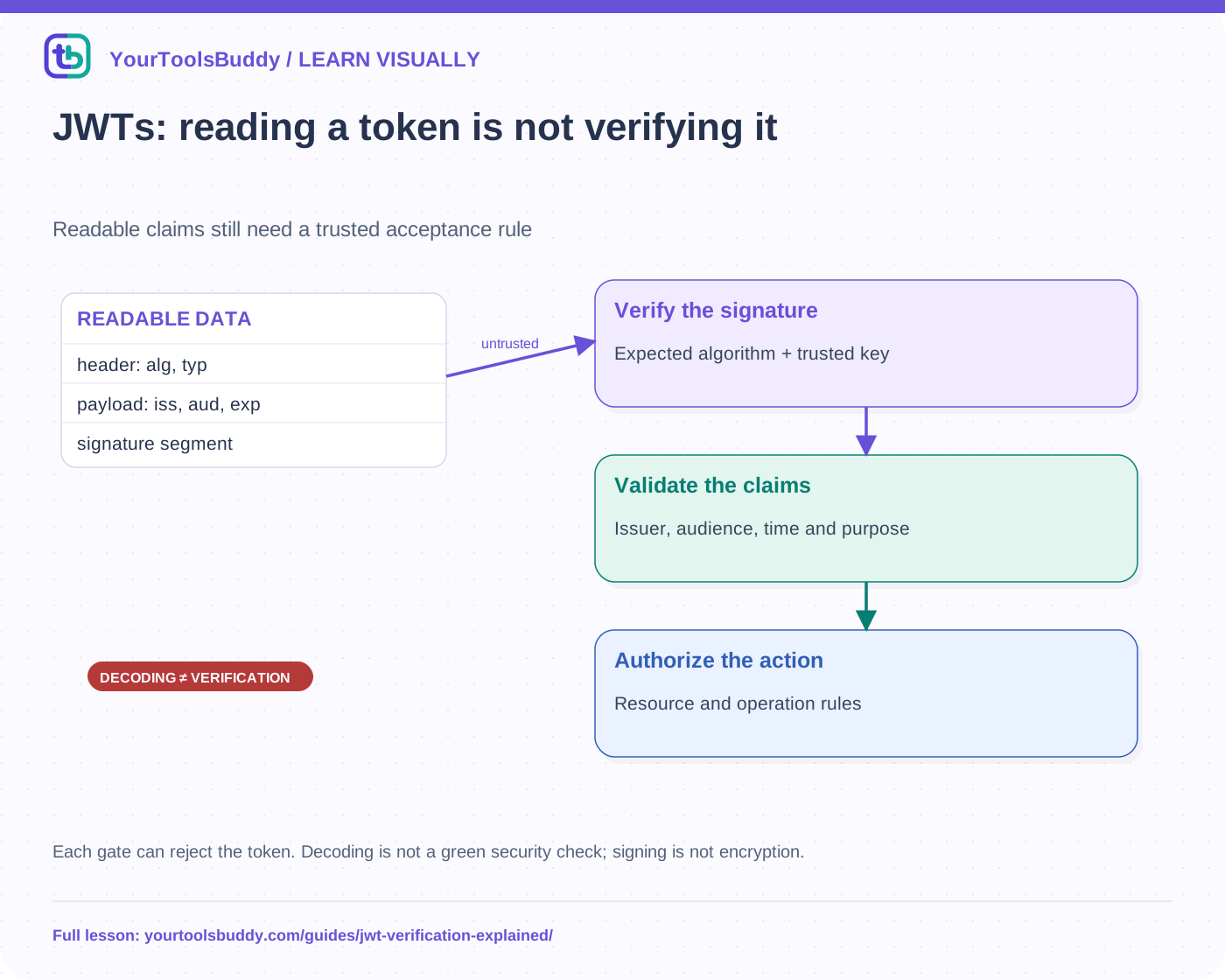
The diagram’s relationships are explained in the readable cards below. Open the full-size SVG to zoom.
Download branded diagram (SVG)Read the diagram
Each gate can reject the token. Decoding is not a green security check; signing is not encryption.
Decode
See untrusted header and claims
Verify
Check expected algorithm and key
Validate
Issuer, audience, time and purpose
Authorize
Decide the permitted operation
Start with the form this example actually uses
A compact signed JWT commonly has three base64url-encoded segments: protected header, payload and signature. The header describes properties such as the algorithm; the payload carries claims. This lesson uses a signed JWS-style token. JWTs can also be encrypted or nested, so three readable segments are not a description of every possible JWT arrangement.
Base64url is an encoding, not encryption. Anyone holding our synthetic signed token can read its payload. Do not put secrets into that payload assuming a signature conceals them. Protect tokens in transit and storage, and avoid pasting live tokens into online decoders, screenshots or support messages.
A signature protects particular bytes under a key
The verifier checks the signing input and signature using the expected algorithm and an appropriately trusted key. It must not accept any algorithm merely because the untrusted header requests it. Key selection, algorithm restrictions and token-type rules belong to the application’s verification policy. A recognizable JSON shape is not cryptographic evidence.
Our executable example uses a deliberately public teaching key with HS256. It creates a token for a fictional lesson API and verifies it using Node’s cryptographic library. This is a demonstration, not a production key or a recommendation to deploy hand-written authentication. HMAC uses a shared secret; asymmetric signing has different key-sharing properties.
Tampering is the first failure to test
The fixture changes a payload value while keeping the original signature. The new payload still decodes as valid JSON, but the verifier rejects it. This is the distinction the lesson is designed to teach: readable, plausible claims and accepted claims are not the same thing. The test also rejects an unsupported header algorithm rather than silently following it.
Reject malformed structures and invalid signatures before relying on claims. A production library must handle parsing, supported encodings and algorithm-specific validation correctly. A short code example is not evidence that all edge cases, attacks or interoperability requirements have been covered.
Correct signatures are necessary but not sufficient
A valid token from the wrong issuer should not become your application’s authority. A token intended for service A must not automatically work at service B. The audience identifies intended recipients under the relevant profile. Expiration and not-before claims constrain time, with clock handling governed by the implementation’s documented policy.
Our fixture fixes an evaluation time and rejects an expired token, a wrong audience and a wrong issuer. Fixed time makes the results reproducible. It is not a production clock-skew policy. Real acceptance rules also depend on the token’s purpose and protocol; do not blindly require or ignore claims without understanding that contract.
Authentication and authorization still need application rules
After token validation, the application decides whether this principal may perform this operation on this resource. A verified token is not permission to read every record. An old role or account state may need additional checks, and the service needs a revocation/session strategy suitable for its design.
The phrase “stateless token” does not guarantee immediate revocation or eliminate all server-side state. Short lifetimes, server checks, introspection or other mechanisms have different trade-offs. Explain the chosen behavior rather than promising that token validation alone solves logout and stolen-token recovery.
Read the example safely
The public fixture contains only fictional issuer, audience and subject values. Predict which cases pass before running it: valid token passes; changed payload, wrong audience, wrong issuer, expired time and unsupported algorithm fail. If a decoder displays all of them, it is showing data rather than proving acceptance. That can be useful for learning, as long as the distinction remains explicit.
Limits
We do not build a login system, integrate an identity provider or implement every JWT/JWS/JWE profile. The example key is intentionally unsuitable for real security. Use maintained verification libraries and the issuer’s current documentation in applications; keep real tokens and keys outside public examples.
Work through the checked example
Input
Public HS256 teaching key; fixed now=1000; exp=1100
Expected issuer=https://issuer.example; audience=lesson-api
Expected result
Valid token: accepted
Changed payload: rejected
Wrong audience: rejected
Wrong issuer: rejected
Expired at now: rejected
Unsupported algorithm: rejected
Malformed token: rejected
What if it fails?
Real HMAC checks for this narrow fixture, not a production JWT implementation. Never use this key or paste live tokens.
Original synthetic teaching fixture. No remote connection or real account is used.
References
Sources used to check the explanations and examples are listed below.
Found a mistake? Send a correction with this lesson’s title, URL and disputed detail. No login needed.
Continue learning
OAuth: let an app act without giving it your password →
HTTP vs HTTPS: what Chrome’s new warning actually protects →
All visual lessons and practical guides →