
LEARN VISUALLY · AI basics
On-device AI vs cloud AI: where does your data get processed?Follow the input, the model and the fallback
Compare local, cloud and hybrid processing, distinguish model downloads from prompt uploads, and inspect fallback using an executed synthetic routing example.
A summary appears in your browser. Did the paragraph stay on the device, travel to a cloud model, or take a fallback route? Follow a fictional note to separate those choices without submitting private data.
Jump to a section
The big picture
Open full-size diagram ↗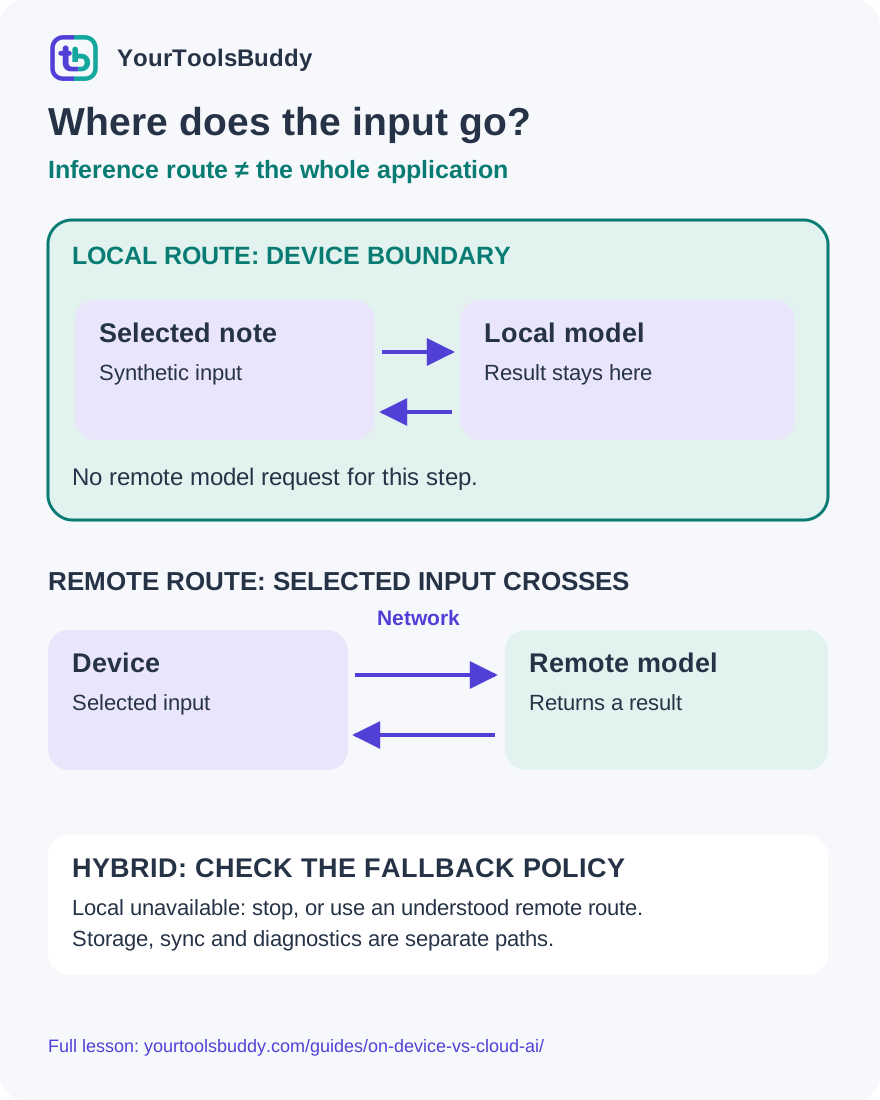
The diagram’s relationships are explained in the readable cards below. Open the full-size SVG to zoom.
Download branded diagram (SVG)Read the diagram
Simplified data-flow model. Arrows show input/result movement, not training or a packet capture. A local inference step does not certify the whole application’s privacy.
Identify the input
Use the exact selected paragraph or file, not a vague assumption about everything visible in the app.
Find the processor
A local model processes on the device; a remote model receives selected input across the network.
Inspect the fallback
When local is unavailable, stop or follow an explicitly understood remote policy.
Check the wider application
Model inference, account history, diagnostics and external tools are separate data-handling questions.
The same button can hide different journeys
Imagine a student selecting a short paragraph and pressing Summarize. A result appears inside the same familiar window. That tells you where the result is displayed, but not where the computation happened. The application might have used a model on the laptop, sent the paragraph to a remote service, or switched between those paths depending on availability.
The useful question is therefore more specific than is this app AI powered? Ask which input crosses which boundary, what processes it, and where the result is stored afterward. A local model can be one part of an application that also has account sign-in, cloud documents or analytics. A remote model can receive a deliberately limited excerpt rather than the entire original file. The particular workflow determines the actual journey.
This lesson follows a fictional note through local, remote and hybrid routes. You will see why model downloads are different from sending a prompt, why offline behavior can mislead, and how to ask clearer questions before sharing private information. We also execute a small routing exercise using synthetic text and a mock service; it makes no claim about any real model’s quality or an application’s complete privacy behavior.
First separate training from using a model
Using a model to produce an answer from an input is often called inference. Training and fine-tuning are processes that create or adapt model behavior using data. Downloading an already prepared model and running it on a device does not mean that the device is training that model each time you type a sentence.
A fictional notebook assistant might load model files, receive a paragraph and generate a summary. Those are three different operations. The download brings software or model data to the device. Inference consumes the paragraph. Saving the resulting summary may involve a fourth operation with a different destination. Keeping those stages separate prevents one reassuring statement from being stretched across the entire product.
Do not infer a provider’s training or retention policy from the word cloud alone. Those policies depend on the particular service, product tier, configuration and agreement. Likewise, on-device inference does not by itself tell you whether another application component copies a document into account history. Read the specific data-handling explanation for the task you plan to perform rather than borrowing a promise from an unrelated feature.
Local inference: the input stays with the local model
In the local route shown in our diagram, the application sends a fictional paragraph to an inference runtime on the same device. That runtime uses the available model and returns a result to the application. No remote model request is needed for this particular step. The model may be managed by the browser or supplied by the application, depending on the implementation.
That can be useful for a narrowly defined task when suitable models and hardware are already available. A student might prefer local processing for a draft paragraph that should not be sent to a remote inference service. However, the student still needs to know how the application stores the draft and what else runs around the local feature.
The phrase local model is a statement about a processing boundary, not a guarantee of perfect answers. A local result still needs checking against the source text and the task. If the model drops a qualification or invents a deadline, the fact that the computation happened nearby does not make the summary correct. Location and output quality are separate dimensions that deserve separate evidence.
Cloud inference: the selected input crosses a boundary
In a remote route, the application sends some input over the network to a service that runs the model. The service processes the request and returns a response. Our diagram labels that crossing explicitly. It does not assume that every remote service receives an identical payload or has identical retention and access policies.
For the fictional notebook assistant, compare sending one public paragraph with sending an entire private notebook containing names and account details. Both requests might produce a short summary, but they disclose very different inputs. Before using a remote feature, identify the actual content being transmitted and whether that recipient is appropriate for it.
A protected HTTPS connection helps protect traffic in transit. It does not make the remote recipient unable to process the content you send. Our HTTP-versus-HTTPS lesson explains that boundary in more detail. When a product says encrypted, ask whether it means transport protection, storage protection or another specific mechanism. None of those words, on its own, answers every question about access, retention or permitted use.
A model download is not a prompt upload
A local feature can need an internet connection before it is ready. The browser or application may first need to obtain model files, runtime components or language resources. That setup traffic is different from sending your selected paragraph to a remote model for inference. An application that says downloading model is not necessarily uploading the current document.
Conversely, seeing one download does not prove that later prompts remain local. The application could use a local model for one task and a remote service for another. A helpful interface should distinguish setup, readiness, processing route and result storage rather than showing one general activity spinner for all four.
Chrome’s current developer guidance illustrates readiness states such as unavailable, downloadable, downloading and available. These are useful concepts even if you never write browser code. They explain why a feature can be supported in principle but unusable right now. A user should get an honest explanation of the missing prerequisite, not an unannounced change of destination for a private paragraph.
Hybrid AI: inspect what happens when local is unavailable
A hybrid application combines local and remote processing options. The important detail is the routing policy: does it prefer the local route, prefer the cloud, ask the user, or fail when the preferred route cannot run? Two products can both describe themselves as hybrid while making different decisions for the same unavailable-device situation.
Google’s Firebase AI Logic example documents a prefer-on-device mode that can fall back to a cloud model when local processing is unavailable and the client is online. Its documentation also cautions that cloud fallback changes privacy and functional expectations. This is a concrete example of why the word prefer is weaker than a promise that input never leaves the device.
For our fictional assistant, imagine a clear local-only choice. If the local model is missing, the assistant should say that the requested route cannot run. If the user separately authorizes a remote route, the application can make that different decision transparently. This is our teaching design, not a claim that all current products offer the same controls or that a single checkbox is sufficient for every organization.
Worked example: count the model-path requests
We executed a small Node routing harness with the synthetic note FICTIONAL note: bring three blue notebooks. The local function returned a fixed value named MOCK_RESULT. A separate HTTP server, listening only on this computer’s loopback interface, returned the same fixed value after receiving a request. Neither route loaded an AI model or generated a real summary.
Why use identical fixed outputs? It makes the lesson precise: looking only at the answer would not reveal the route. Instead, the harness counted requests received by the mock service. The expected local case returned the fixed result with zero service requests. The explicitly permitted remote-path mock returned the same result and increased the request count by one. The recorded payload exactly matched our synthetic text.
That result passed. It demonstrates a data-routing distinction inside the controlled harness, not a privacy audit of a commercial app. The loopback server is not an external cloud. We did not upload private documents, call a paid service, download a model, measure a device accelerator or intercept another application’s traffic. Those boundaries are part of the result, not details to hide behind an impressive-looking animation.
Failure cases: a missing model must not hide a transfer
The harness then tested what should happen when prerequisites fail. An explicitly remote route marked offline returned OFFLINE and made zero service requests. A local route marked unavailable returned LOCAL_UNAVAILABLE. Those errors are different because one concerns a network-dependent route and the other concerns whether the local processing path can run.
For hybrid behavior, the local-available case stayed local and made zero service requests. When local processing was unavailable and remote permission was absent, it returned REMOTE_NOT_ALLOWED, again with zero requests. With separate remote permission present, that same unavailable-local scenario made exactly one request to the loopback mock. Across all seven cases, the expected total was two mock-service requests; the recorded total was two.
This is a useful failure lesson for implementers and readers alike: test the fallback condition, not only the happy path. The harness enforces its own explicit teaching policy; it does not reproduce Firebase behavior or certify a vendor’s implementation. A production application would also need proper error handling, storage decisions, permissions, secure transport and broader review. Our exercise is intentionally too small to serve as a complete product architecture.
A current example: on-device scam detection research
Google DeepMind’s October 14, 2026 announcement describes a collaboration with GovTech Singapore on an on-device scam-detection model. The stated design uses a lightweight screening stage before deeper conversation analysis with a fine-tuned model. The announcement discusses user consent and a phased rollout through applications, rather than announcing one universally available feature for every phone.
Treat that as an attributed vendor description. We did not install the model, test scam recognition or measure false alarms. We also do not infer that the model is available in India, that it is included in every messaging app, or that a warning-free message is safe. The useful learning connection is the processing location and the need to explain what an application can access.
If a tool flags a conversation, a person still needs a sensible next step. In a fictional example, an urgent request can be independently checked through a contact route already known to the person. A model output is a signal to evaluate, not authority to send money, disclose credentials or obey instructions embedded in the message. No real messages are needed to study this data-flow example.
Choose for the task instead of choosing a slogan
Consider a student drafting a private note, a freelancer processing a public product description, and an office worker handling a restricted document. The same model-routing choice does not automatically suit all three. The input sensitivity, required capability, approved recipients and consequences of a wrong result matter more than a broad local-versus-cloud ranking.
Local execution consumes device resources and requires a compatible runtime and model. Remote execution relies on an accessible service and an acceptable data-sharing arrangement. Larger models and particular capabilities may be offered remotely; a carefully scoped local task may be a good fit for a smaller available model. These are design considerations, not measured speed or accuracy results from our exercise.
Avoid the claim that on-device always means free or that cloud always means expensive. Hardware, downloads, battery use, subscriptions and request charges depend on the actual product and plan. This lesson does not compare prices or recommend a purchase. For a real decision, inspect the current requirements and costs of the exact feature, and test its output on representative permitted inputs.
Local inference is not the whole application
Draw a second boundary around the entire application. A document may already live in a synchronized folder. The app may save history to an account, send diagnostic events or use an external search tool after generating an answer. Those paths are separate from the local model arrow, and a complete explanation needs to account for them too.
Our mock request counter sees only the service endpoint we deliberately created. It cannot establish that an arbitrary app makes no other requests. Even a successful offline run proves something narrower than universal privacy: that the observed task completed under the conditions of that run. It does not describe every later action, update or optional integration.
A useful product explanation names the input, processor, destination, fallback and storage behavior. If those details are missing, avoid inserting a sensitive document just to discover them experimentally. Use public or synthetic examples, consult the feature documentation and follow your organization’s approved process. The absence of an upload button is not evidence that no data is transmitted automatically.
Practice: explain the result and its limits
Question one: an app downloads model files before a local task works offline. Does the download alone prove that your paragraph was uploaded? Answer: no. Model delivery and prompt submission are different operations. You still need evidence about how that feature handles the paragraph.
Question two: two runs produce the same summary text, but one sends a model request and one does not. Can the displayed result identify the processing route? Answer: no. Our mock exercise makes that ambiguity deliberate. Check the documented route and suitable evidence rather than guessing from answer quality.
Question three: a hybrid tool says prefer local. The device cannot run its local model. Is it safe to assume there will be no remote request? Answer: no. Inspect the fallback policy. Prefer can allow another route; a local-only requirement needs a behavior that remains local or stops.
Question four: the synthetic harness made no mock-service requests in its local case. Have we proved that a particular browser product never sends telemetry? Answer: no. We measured one deliberately limited request path in our own harness. A complete application assessment would require different evidence.
Five questions before the next AI button
Before using a feature, ask what input it will process, where the model runs, what happens if that route is unavailable, who receives any transmitted data, and where the result or history is saved. Write those answers against the actual task, such as summarizing one selected public paragraph, instead of against the entire brand name.
Then check the output. Compare a summary with its source, preserve qualifications and verify important facts. For a mock or prototype, label fixed results and synthetic data honestly. A diagram can teach routing without pretending to be a recording of real inference. Our lesson and its companion video deliberately keep those categories distinct.
The practical takeaway is simple: follow the arrows around the input, not just the location of the window. On-device processing can keep a model step local; cloud processing sends selected data to a remote processor; hybrid routing depends on its policy. Understanding the boundaries lets you ask better questions and avoid treating one local feature as a promise about everything an application does.
References
Sources used to check the explanations and examples are listed below.
- Google DeepMind: Singapore on-device scam-detection collaboration, 14 October 2026
- Chrome for Developers: built-in AI overview
- Chrome for Developers: model readiness and download requirements
- Chrome for Developers: hybrid AI routing and cloud fallback
- Google AI Edge: LiteRT-LM overview
Found a mistake? Send a correction with this lesson’s title, URL and disputed detail. No login needed.
Continue learning
Understand protected connections and their limits →
An API contract and an SDK are different →
All visual lessons and practical guides →