
LEARN VISUALLY · Data foundations
SQL joins: explain every row in the resultMatch records without hiding missing or repeated relationships
Use a small customers-and-orders dataset to compare INNER JOIN and LEFT JOIN, inspect NULL values and explain why one customer can produce several rows.
Your report says there are three customers, but joining orders produces four lines. Another customer disappears completely. Neither result is necessarily a database bug: the query may be answering a different question from the report.
Jump to a section
The big picture
Open full-size diagram ↗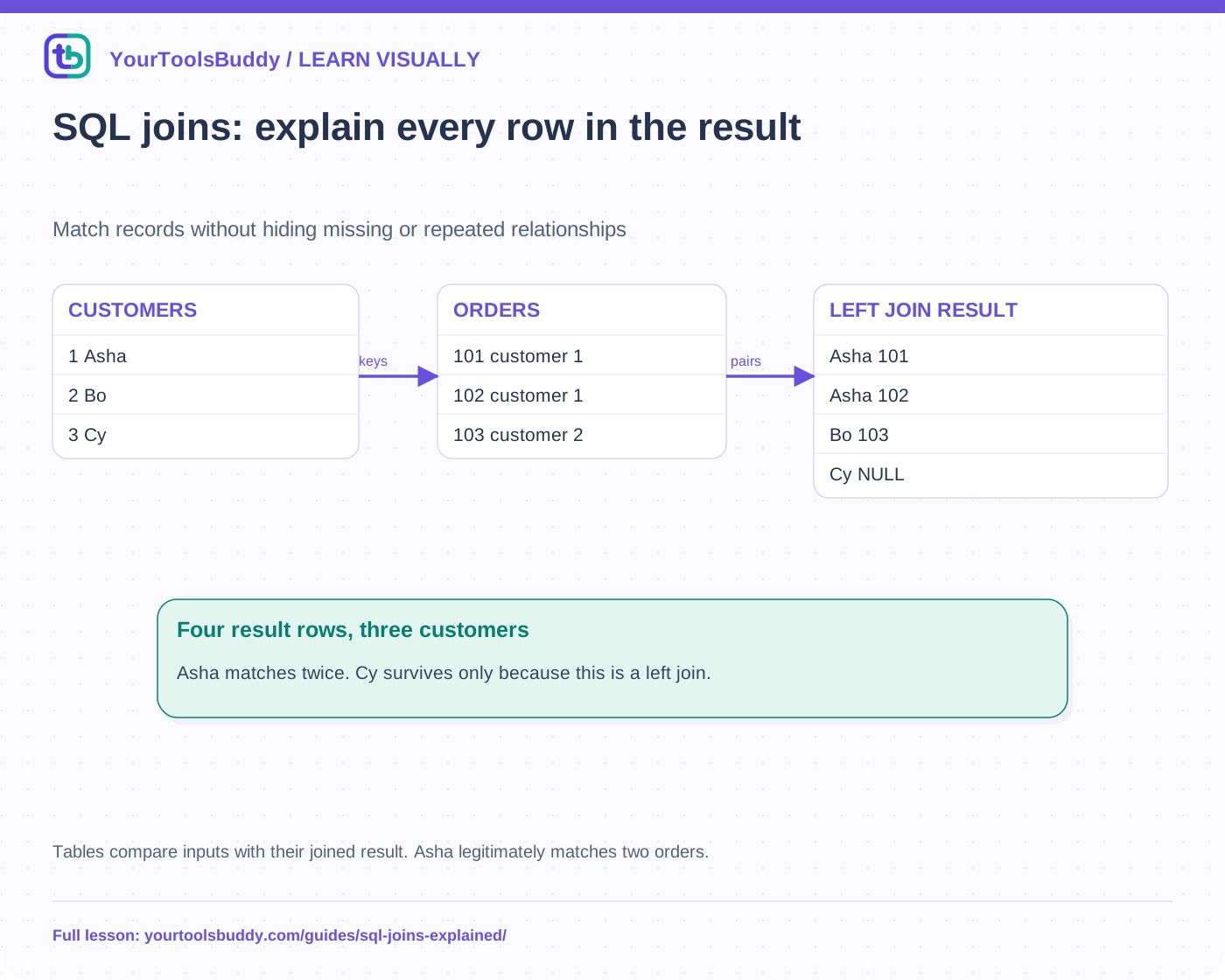
The diagram’s relationships are explained in the readable cards below. Open the full-size SVG to zoom.
Download branded diagram (SVG)Read the diagram
Tables compare inputs with their joined result. Asha legitimately matches two orders.
Customers
1 Asha · 2 Bo · 3 Cy
Orders
101→1 · 102→1 · 103→2
Inner result
Three matching pairs
Left result
Three pairs plus Cy with NULL
Start with the relationship, not a Venn diagram
Our synthetic customers table contains Asha with id 1, Bo with id 2 and Cy with id 3. Orders 101 and 102 belong to customer 1; order 103 belongs to customer 2. This is a one-to-many relationship. The shared customer identifier connects the tables. Names are display values; matching on a name would create ambiguity if two people had the same name or one spelling changed.
Before writing the query, state the question. “Show orders with customer names” is different from “show all customers, including those with no orders.” Choose output columns deliberately so duplicate column names do not hide which table supplied a value. A table alias such as c or o makes the relationship easier to read.
An inner join keeps matching pairs
Join customers c to orders o on c.id = o.customer_id. The inner result contains Asha with order 101, Asha with order 102 and Bo with order 103. Cy has no matching order, so no Cy row is returned. Asha’s repeated name is expected: each output row represents a matching customer-order pair, not a unique customer.
If a report counts those three rows as three distinct buyers, its interpretation is wrong. Decide whether you need orders, customers or an aggregate per customer. DISTINCT can hide repetitions in selected columns, but it is not a substitute for understanding why rows multiplied. A join to another one-to-many table can multiply them again.
A left join preserves the left side
Using the same match condition with LEFT JOIN keeps Cy. The order columns for Cy are NULL because no matching order supplied them. NULL is not the string “NULL,” an empty order object or an order with id zero. It represents the missing right-side values in this result.
The left-join result now has four rows: two for Asha, one for Bo and one unmatched Cy row. Preserving all customers does not mean exactly one output row per customer. If you want that, explicitly group or construct the intended summary. The number of customer records and the number of joined rows still answer different questions.
A filter can undo the preservation
Imagine adding WHERE o.id = 101 after the left join. Cy’s unmatched row cannot satisfy that condition, so it disappears. The join still says LEFT JOIN, but the later filter removes the very rows you hoped to preserve. A right-side condition inside ON controls which rows match; a condition in WHERE filters the already formed result.
For “all customers, with order 101 if present,” put that order condition in the match. For “only customers who have order 101,” an inner join or equivalent filtering may be appropriate. Explain the business question first, then select the query shape. There is no universal rule that one placement is always correct.
Execute a deliberately small dataset
The companion example creates the tables in an in-memory SQLite database and executes both joins with explicit ordering. It expects inner pairs 1:101, 1:102, 2:103 and left pairs with 3:NULL added. PostgreSQL documentation supplies the general relational explanation; this execution is SQLite evidence, not a claim that PostgreSQL was installed or benchmarked.
Try the WHERE condition and then the ON condition above. Predict whether Cy survives before inspecting the answer. This boundary case tests understanding more effectively than a large dataset whose output cannot be checked by eye. No private customer data is involved.
Avoid accidental cartesian multiplication
Omitting the intended relationship can produce combinations you did not mean. Three customers crossed with three orders produce nine pairs. That is valid for some questions, but it is not our customer-order report. If the count grows unexpectedly, inspect keys, uniqueness assumptions and each join stage before adding DISTINCT or changing data.
What this lesson leaves out
We focus on equality-based inner and left joins, NULLs and one-to-many relationships. Full outer joins, window functions, execution algorithms and database-specific optimization need separate treatment. Correct result semantics come before performance tuning. The fixture verifies exact rows, not production schema design or the suitability of these fields for a real customer system.
Work through the checked example
Input
Customers: 1 Asha, 2 Bo, 3 Cy
Orders: 101→1, 102→1, 103→2
Expected result
INNER: (1,101), (1,102), (2,103)
LEFT: same pairs plus (3,NULL)
WHERE o.id=101: 1 row
ON includes o.id=101: 3 rows
CROSS: 9 rows
What if it fails?
Executed in SQLite, not PostgreSQL. Rows count pairs, not distinct customers.
Original synthetic teaching fixture. No remote connection or real account is used.
References
Sources used to check the explanations and examples are listed below.
Found a mistake? Send a correction with this lesson’s title, URL and disputed detail. No login needed.
Continue learning
Database indexes: faster lookups have a cost →
Pagination: why an item can appear twice—or vanish →
All visual lessons and practical guides →